> For the complete documentation index, see [llms.txt](https://docs.coherence.io/llms.txt). Markdown versions of documentation pages are available by appending `.md` to page URLs; this page is available as [Markdown](https://docs.coherence.io/1.1/coherence-sdk-for-unity/networking-state-changes/hierarchies-and-child-objects/nesting-prefabs-at-edit-time.md).
# Nesting Prefabs at Edit time
Preparing nested connected Prefabs at edit time
coherence supports all Prefab-related Unity workflows, and nesting is one of them. It can make a lot of sense to prepare multiple networked Prefabs, parent them to each other, and either place them in the scene, or save them as a complex Prefab, ready to be instantiated. This page covers these cases.
### Nested Prefabs for instantiation
When preparing a networked Prefab that contains another networked Prefab, one extra component is needed to allow **coherence** to sync the whole hierarchy: `PrefabSyncGroup`.
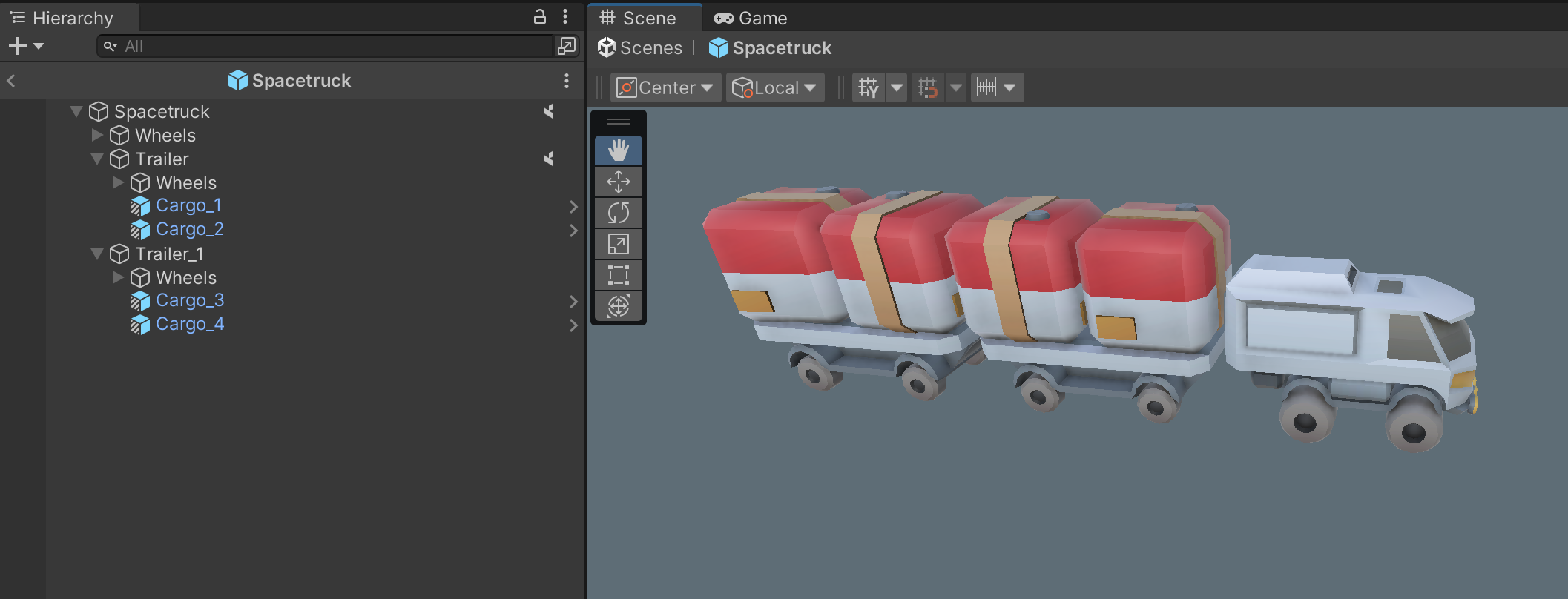
For instance, let's suppose we have a vehicle in an RTS that can carry cargo, and it comes with cargo pre-loaded when it's instantiated:
In this example **Spacetruck** is a synced Prefab, with 4 instances of the synced Prefab **Cargo** nested within. To make this work, we add a `PrefabSyncedGroup` to the root:
The component keeps track of child Prefabs that are also synced Prefabs. Now, whenever **Spacetruck** is instantiated, `PrefabSyncGroup` makes sure to take 4 instances of **Cargo** and link the Prefab instances to the correct network entities.
{% hint style="warning" %}
Please note that if the nested Prefabs are more than one level under the root object, you still need to add a `CoherenceNode` component to the child ones (in the example above, **Cargo**), to enable [deep nesting at runtime](/1.1/coherence-sdk-for-unity/networking-state-changes/hierarchies-and-child-objects/coherencenode.md).
{% endhint %}
So to recap:
* The outermost Prefab needs `CoherenceSync` and `PrefabSyncGroup`.
* The child Prefabs need `CoherenceSync` and, optionally, `CoherenceNode`.
### Nested Prefabs pre-placed in a Unity scene
When dealing with synced Prefabs that are hand-placed in the scene before connecting, such as level design elements like interactive doors, you need to ensure that they are seen as "unique". This is also covered in the [Uniqueness page](/1.1/coherence-sdk-for-unity/lifetime/configuring-persistence.md), but it's worth talking about it in the context of nested synced Prefabs.
When preparing such a Prefab, you need to set the *Uniqueness* property to *No Duplicates*. This ensures that, once multiple Clients connect and open the same scene, the synced Prefabs contained within are not spawned on the network multiple times.
Let's suppose we have a networked Prefab that represents a structure in an RTS (a **LandingPad**) that can be pre-placed in the scene. This structure also contains a networked vehicle Prefab (a **Lander**). This Prefab is synced as an independent network entity because at runtime it can detach, change ownership, be destroyed, etc.
To achieve this, all we need to do is ensure that both Prefabs are set to be **unique**. When we drag-and-drop the **LandingPad** Prefab into the scene, **coherence** automatically assigns a randomly-generated *Prefab Instance Unique ID* as an override. This number identifies these particular instances of these two Prefabs in the scene.
Each instance received its own unique ID
With this setting, we don't need to do anything else for these compound Prefabs to work.
{% hint style="warning" %}
Like for runtime-instantiated Prefabs, keep in mind that if the **Lander** is nested[ 2 or more levels deep](/1.1/coherence-sdk-for-unity/networking-state-changes/hierarchies-and-child-objects/coherencenode.md) in the hierarchy, it will also need a `CoherenceNode` component.
{% endhint %}
{% hint style="success" %}
If you plan to also instantiate this Prefab at runtime, you can add a `PrefabSyncGroup` to the root as described in the [previous section](#nested-prefabs-for-instantiation). This makes the Prefab work when instantiated at runtime, while the uniqueness takes care of copies in the scene.
{% endhint %}
To recap:
* The outermost Prefab needs its *Uniqueness* set to *No Duplicates*. Optionally, you can add `PrefabSyncGroup` to enable runtime-instantiation.
* Any child Prefab also needs its *Uniqueness* set to *No Duplicates*. It also needs a `CoherenceNode` if it's parented deep in the hierarchy.
#### Unique IDs on already-placed Prefabs
An important thing to keep in mind when working with compound Prefabs in the scene: when you add a new nested synced Prefab to an existing one that has **already been placed in the scene** a few times, the *Prefab Instance Unique ID* for these instances will initially be the same.
For this reason, once you play the game, you might see all children disappear (except one). That is normal: **coherence** thinks that all these network entities are the same, because they have the same uniqueness ID.
You need to ensure that these new children have an overriden and unique ID **on each instance** in the scene. To do so, click on the button next to the *Prefab Instance Unique ID* for each child that needs it:
Press the button to generate a new unique ID for this instance