Here is the roadmap of the coherence SDK, engine and backend. We're constantly listening to your feedback to improve coherence. Please reach out on our forum and discord if you have suggestions.
Better API reference documentation
Channels (ordered/unordered, reliable/unreliable)
Synchronizing Lists
Improvements to Uniqueness
Performance improvements
Scene transitioning improvements
Fully authoritative Simulator
Improvement to online dashboard logs
More code samples
Inventory
Debug tools
Built-in network condition simulation
Network profiler
Global KV store
Support for multiple Simulators and Replicators in a single project
More logging and diagnostics tools
Additional server regions
Support for lean pure C# clients and simulators without Unity
Voice
Matchmaking
Leaderboards
Console-specific updates
Mobile-specific updates
Platform-specific accounts
Bare-metal and cloud support
Unreal Engine SDK
Fast network engine with cloud scaling, state replication, persistence and auto load balancing.
Easy to develop, iterate and operate connected games and experiences.
SDK allows developers to make multiplayer games using Windows, Linux or Mac, targeting desktop, console, mobile, VR or the web.
Game engine plugins and visual tools will help even non-coders create and quickly iterate on a connected game idea.
Scalable from small games to large virtual worlds running on hundreds of servers.
Game-service features like and .
At the core of coherence lies a fast network engine based on bitstreams and a data-oriented architecture, with numerous optimization techniques like delta compression, quantization and ("Level of Detail") to minimize bandwidth and maximize performance.
The network engine supports multiple models:
Client authority
Server authority
Server authority with client prediction
Authority handover (request, steal)
Different authority models can be mixed in the same game.
coherence supports out of the box. This means that the state of the world is preserved no matter if clients or simulators are connected to it or not. This way, you can create shared worlds where visitors have a lasting impact.
Custom UDP transport layer using bit streams with reliability
WebRTC support for WebGL builds
Smooth state replication
Server-side, Client-side, distributed authority
Unity SDK with an intuitive no-code layer
Per-field adjustable interpolation and extrapolation
Input queues
Easy deployment into the cloud
Per-field compression and quantization
Per-field sampling frequency adjustable at runtime
Unlimited per-field levels of detail
Areas of interest
Online Dashboard for management and usage statistics
Automatic server deployment and scaling
Multiple regions in the US, Europe and Asia
Player accounts with a persistent key/value store
Deterministic client prediction with rollback ("GGPO") - experimental
Connected entity support
Fast authority transfer
Remote messaging (RPC)
Persistence
Verified support for Windows, macOS, Linux, Android, iOS and WebGL
Support for Rooms and Worlds
Floating Origin for extremely large virtual Worlds
TCP Fallback
Support for Client hosting through Steam Datagram Relay
Multi-room Simulators
Multiple code generation strategies (Assets/Baking, automated with C# Source Generators)
Extendable object spawning strategies (Resources, Direct References, Addressables) or implement your own
Accurate Simulation Frame tracking
Network profiler
Matchmaking and lobby rooms
coherence is a network engine, platform, and a series of tools to help anyone create a multiplayer game.
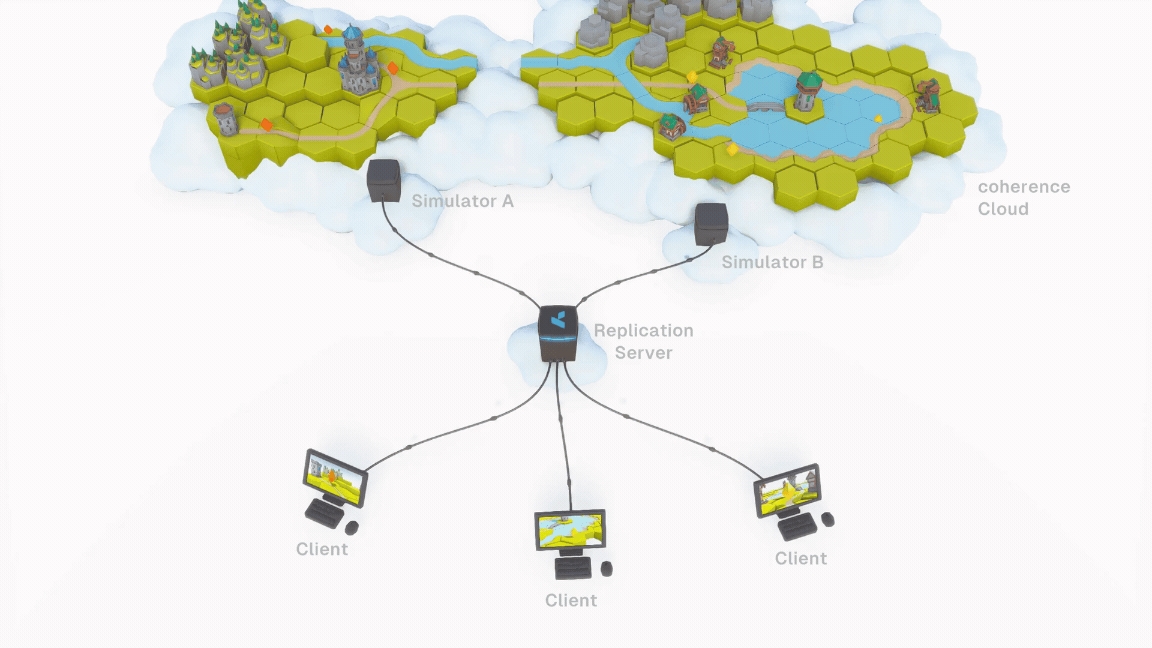
Our network engine is our foundational tech. It works by sharing game world data via the Replication Server and passing it to the connected Clients. The Clients, in this context, can be regular game Clients (where a human player is playing the game) or a special version of the game running in the cloud, which we call "Simulator".
While coherence's network engine is meant to be game engine agnostic, we offer SDKs to integrate with popular engines (for instance, Unity).
The coherence Unity SDK provides a suite of tools and pre-made Unity components, and a designer-friendly interface to easily configure network entities. It also takes care of generating netcode via a process called "Baking". In fact, simple networking can be setup completely without code.
But coherence is not just an SDK.
The is a platform that can handle scaling, matchmaking, persistence and load balancing, all automatically. And all using a handy . The coherence Cloud can be used to launch and maintain live games, as well as a way to quickly test a game in development together with remote colleagues.
For more information about how a network topology is structured in coherence, check out this video:
A lean and performant smart relay that keeps the state of the world, and replicates it efficiently between various Simulators and game Clients.
The Replication Server usually runs in the , but developers can start it locally from the command line or the Unity Editor. It can also be run on-premise, hosted on your servers; or be hosted by one of the Clients, to create a scenario (Client-hosting).
A special version of the Game Client without graphics (a "headless client"), optimized and configured to perform server-side simulation of the game world. When we say something is simulated "server-side", we mean it is simulated on one or several Simulators.
A regular build of the game. To connect to coherence, it uses our.
Clients (and Simulators) can define (Live Queries), levels of detail, varying simulation and replication frequencies and other to control how much bandwidth and CPU is used in different scenarios.
This is the process of specific to the game engine that takes care of network synchronization and other network-specific code. This is also known as "baking", and it's a completely automated process in coherence, triggered by just pressing a button. You can however for very advanced use cases.
An easy-to-manage platform for hosting and scaling the backend for your multiplayer game. The coherence Cloud can host a Replication Server, but also Simulators.
In addition, every project can have a showcase page where you can host !
Our cloud-backed dashboard, where you can control all of the aspects of a project, configure matchmaking, Rooms, Worlds, and keep an eye on how much traffic the project is generating.
For more coherence terminology, visit the .