How to use Client-hosting to connect clients directly
Game Clients normally connect to one another via the coherence Cloud services, but it is also possible to implement a peer-to-peer (P2P) scenario where they connect via 3rd party relays, such as Steam Networking, Epic Online Services and Azure PlayFab. These relays are essential for the Game Clients to find one-another and maintain connectivity.
This makes it possible for your coherence-enabled game to host the Replication Server directly on one of the Client machines, without using our cloud services. Hence, when we talk about peer-to-peer in coherence we refer to it as Client-hosting.
It involves three main parts:
A mechanism for bundling the coherence Replication Server with the game.
SDK methods that start and stop the Replication Server on the player's personal device.
A relay for communication between the Replication Server and some 3rd party networking service, such as .
Players running their own local Replication Server will still be bound by the legal terms of the coherence end user agreement. For questions regarding this, please reach out to us at the [email protected] email address.
Pros and cons
If you decide to release your game with support for Client-hosting, it is important to first consider the tradeoffs of this approach:
Server costs will be paid by those who provide the networking service, i.e. Valve in the case of relying on Steam Networking. The same goes for all major game consoles - running a networking service is effectively free for multiplayer game developers.
Players will be running the Replication Server on their personal devices, so their specs and network conditions will have some impact on performance and reliability for all players.
You will not have access to the full range of features included when you're using the coherenceCloud services.
Getting started with Client Hosting
Once you have decided that Client Hosting is a good fit for your game, you can head to the . Don't forget to also check the .
It lets your players keep playing the game over the Internet, even if your company or coherence goes out of business.
To bundle the coherence Replication Server with the build of your game, go to coherence > Settings > Bundle stand-alone Replication Server and check what platforms should have this feature enabled.
Currently, coherence supports bundling on Windows, MacOS, and Linux. We are working on adding support for more platforms in the future.
Replication Server bundling options
If your game uses a custom build process where the automatic bundling doesn't work well, you can also use a manual approach.
Here's a code example:
The BundleWithStreamingAssets method will copy the Replication Server and a combined schema (which contains all active schemas) for the target platform into the .
Starting a local Replication Server
To start the bundled Replication Server from within your game, you can use the Launcher and ReplicationServer classes provided by the coherence Unity SDK. It will make sure that the correct parameters are passed to the Replication Server at startup, and it will also help you manage the child process.
Here's a simple code example of how to start and stop the Replication Server using the coherence API:
It is very important to keep track of your child process (via the ReplicationServer class) and close it down properly, or else you will leave the Replication Server running on the user's machine. Note that it's only the person hosting a game that needs to start an instance of the Replication Server, players joining a game should connect normally.
In case your game crashes, and your child processes are not cleaned up, it might be useful to set AutoShutdown = true so that the Replication Server (RS) will automatically shut down after AutoShutdownTimeout milliseconds (defaults to 10 seconds) when no Clients are connected to it.
Replication Server log output
By default, the coherence Replication Server will output its logs to the standard output. Use OnLog event in the ReplicationServer class to receive log events in your Unity application. If you configure the LogTargets in the ReplicationServerConfig object, make sure to add a LogTarget.Console target or OnLog event will not work as expected.
Relays
For players to communicate with one another over the Internet, a networking service is required. The networking service provides features such as setting up games, establishing connections, and sending data.
By default, coherence provides all of these networking services out-of-the-box. In this scenario, players all communicate with one another via a Replication Server that is hosted in the coherence Cloud, so you don't have to worry about anything.
In a Client-hosted scenario however, the Replication Server runs on the hosting player's machine. Therefore, the connectivity between clients and host must be provided via an external networking service. In the context of Client-hosting, we call such networking service a relay, since it is used to relay traffic between the Clients and the Replication Server running on the host's machine. You can also think of a relay as tunneling traffic between clients and host.
Steam relay
Steam offers a free networking service for games available on its platform. In order to use you'll need a registered with a valid Steam App ID. Once you have a Steam App ID, you'll be able to pass messages between clients via Steam's servers.
To make things easy, coherence provides a complete Steam relay implementation that provides out-of-the-box networking over Steam. The Steam relay utilizes the to access the Steam API.
The sample code also demonstrates how to register a lobby with the Steam Matchmaking API to make it easy for players to find and join an ongoing session.
The Steam relay is available here: https://github.com/coherence/steam-integration-sample.
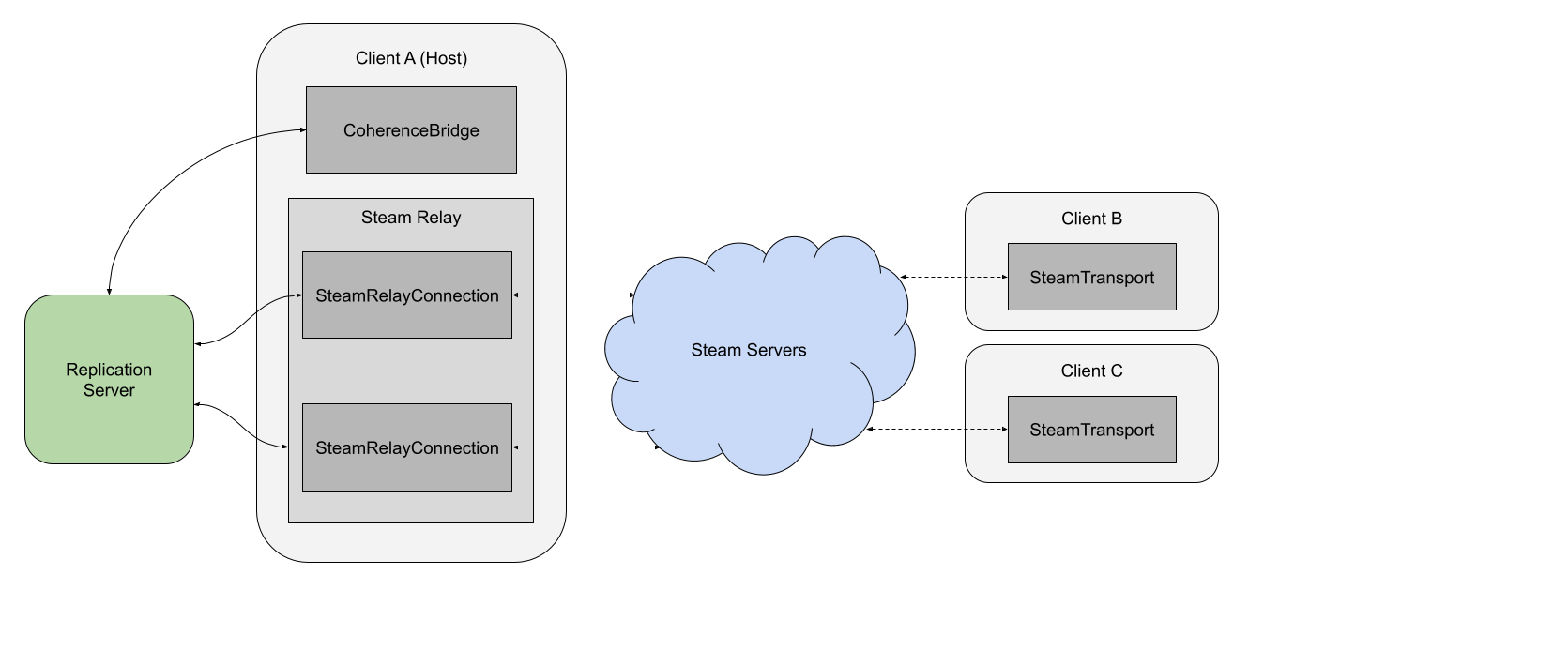
Connecting over Steam, step-by-step
The host (Client A) starts a Replication Server on its local machine.
The host connects to the local Replication Server.
The host initializes a SteamRelay that listens for incoming Steam connections.
Although the diagram above shows that traffic is routed via Steam servers, it is often the case that traffic can flow directly between player and host machines without actually making the extra hop via the Steam servers. This technique is commonly referred to as "hole punching" or "NAT Punch-through" and greatly reduces latency, however, it is not supported on all networks due to firewall restrictions.
Steam's networking service will first attempt a NAT punch-through and then automatically fall back to relayed communication if the punch-through failed.
To be able to test your game with the SteamRelay you'll need at least two Steam accounts - even for local development. Since only a single Steam account can be logged in to one machine at a time, you will need at least two machines or a sandbox solution to be able to connect. Trying to connect two instances of the game on the same machine will result in "invalid connection" or "failed to create lobby" errors.
Custom relay (Advanced)
Similar to the Steam relay above, you can create your own custom relay implementation and route traffic via any networking service. The relay implementation consists of three parts, each class implementing one of three interfaces.
ITransport (Client) - Outgoing connection. Passes messages between the client and the networking service.
IRelay (Host) - Listens for incoming connections and instantiates IRelayConnections.
IRelayConnection (Host) - Incoming connection. Passes messages between the Replication Server and the networking service.
Let's say we want to implement a custom relay that uses an API called FoobarNetworkingService. The code here outlines the main points to implement for routing network traffic.
First, we'll create a CustomTransport class to manage the outgoing connection from the client to the host. CustomTransport implements the ITransport interface that provides a few important methods. The Open and Close methods are used to connect and disconnect to/from the networking service. The Send and Receive methods are used to send and receive messages to/from the networking service.
The CustomTransport will be instantiated when the client attempts to connect to the host, usually as a result of calling CoherenceBridge.Connect. You can control how the transport is instantiated by implementing an ITransportFactory.
Finally, to configure the client to actually use the CustomTransport, just set the transport factory on CoherenceBridge.
This is everything needed on the client-side.
You can call _SetTransportFactory(null)_ to disable the custom transport and connect as normal.
On the host-side, we need a CustomRelayConnection class to manage the incoming connection. This class implements IRelayConnection and is a mirror image of the CustomTransport. The OnConnectionOpened and OnConnectionClosed methods are called in response to CustomTransport.Open and CustomTransport.Close. The SendMessageToClient and ReceiveMessagesFromClient methods are responsible for sending and receiving messages over the networking services, similar to CustomTransport.Send and CustomTransport.Receive.
Now we just need a CustomRelay class that listens for incoming FoobarConnections and maps them to a corresponding CustomRelayConnection.
Finally, to configure the host to actually use the CustomRelay, simply set the relay on the CoherenceBridge:
You can call SetRelay(null) to disable relaying.
These are all the necessary steps required to configure a custom relay.
For a complete relay code example, please review the .
Another player (Client B) connects to the host via Steam using the SteamTransport.
The SteamRelay accepts the incoming connection, creating a SteamRelayConnection.
The SteamRelayConnection immediately starts passing data between the Steam servers and the Replication Server.
The relayed connection is now fully established. All data between Client B and the Replication Server is relayed through Steam.
For each new Client that connects, steps 4-7 are repeated.
using Coherence.Toolkit.ReplicationServer;

public class SelfHostingExample
{
    ReplicationServer replicationServer;

    void StartReplicationServer()
    {
        if (replicationServer != null)
        {
            Debug.LogWarning("The Replication Server is already running");
            return;
        }

        var config = new ReplicationServerConfig
        {
            Mode = Mode.World,
            APIPort = 64002,
            UDPPort = 32001,
            SignallingPort = 32002,
            SendFrequency = 20,
            ReceiveFrequency = 60,
            AutoShutdown = false, // shuts down local RS if no Clients are connected
            // AutoShutdownTimeout = 10000
        };

        replicationServer = Launcher.Create(config, $"--env dev");
        replicationServer.OnLog += message => Debug.Log($"Server log: {message}");
        replicationServer.OnExit += code => Debug.Log($"Server exited with code: {code}");
        replicationServer.Start();
    }

    void StopReplicationServer()
    {
        replicationServer.Stop();
        replicationServer = null;
    }
}
var config = new ReplicationServerConfig
{
    Mode = Mode.World,
    APIPort = 64002,
    UDPPort = 32001,
    // ...
    LogTargets = new LogTargetConfig[]
    {
        new()
        {
            Target = LogTarget.Console,
            Format = LogFormat.Plain,
            LogLevel = LogLevel.Debug,
        }
    };
};
using System;
using System.Collections.Generic;
using System.Net;
using Coherence.Brook;
using Coherence.Common;
using Coherence.Connection;
using Coherence.Transport;

public class CustomTransport : ITransport
{
    // Members required by ITransport
    public event Action OnOpen;
    public event Action<ConnectionException> OnError;
    public TransportState State { get; private set; }
    public bool IsReliable => false;
    public bool CanSend => true;
    public int HeaderSize => 0;
    public string Description => "Custom";

    // In this example, data is routed over a FoobarConnection that is provided by the FoobarNetworkingService
    private FoobarConnection foobarConnection;

    // The networking service normally requires some way to identify the host, for example a string or IP-address
    private string hostEndpoint;

    // Instantiates the CustomTransport configured to connect to a specific remote host endpoint
    public CustomTransport(string hostEndpoint)
    {
        this.hostEndpoint = hostEndpoint;
    }

    // This method is called when the client calls CoherenceBridge.Connect
    public void Open(EndpointData _, ConnectionSettings __)
    {
        // Initialize the networking service
        FoobarNetworkingService.Init();

        // Connect to the FoobarNetworkingService
        foobarConnection = FoobarNetworkingService.OpenNewOutgoingConnection(hostEndpoint);

        // Mark the transport as open, i.e. ready to send and receive messages
        State = TransportState.Open;

        // Notify the client that the connection has been opened
        OnOpen?.Invoke();
    }

    // This method is called when the CoherenceBridge disconnects
    public void Close()
    {
        // Mark the transport as closed, i.e., no longer able to send or receive messages
        State = TransportState.Closed;

        // Disconnect from the FoobarNetworkingService
        foobarConnection.Close();

        // Dispose the networking service
        FoobarNetworkingService.Shutdown();
    }

    // This method is not mandatory but can be used e.g., to send a final disconnect message before the connection is closed
    public void PrepareDisconnect() { }

    // This method is called each frame. The buffer should be populated with incoming messages
    public void Receive(List<(IInOctetStream, IPEndPoint)> buffer)
    {
        // If there are any incoming messages, push them to the return buffer
        while (foobarConnection.TryReceiveMessage(out var data))
        {
            buffer.Add((new InOctetStream(data), default));
        }
    }

    // This method is called for each packet that the client wants to send to the Replication Server
    public void Send(IOutOctetStream stream)
    {
        // Convert the stream to a byte-array and send it over the foobarConnection
        foobarConnection.SendMessage(stream.Close().ToArray());
    }

    public void SendTo(IOutOctetStream stream, IPEndPoint endpoint, SessionID sessionID)
    {
        throw new Exception("SendTo not supported on this transport.");
    }
}
using Coherence.Log;
using Coherence.Stats;
using Coherence.Transport;

public class CustomTransportFactory : ITransportFactory
{
    // The transport factory is a good place to inject the host identifier or endpoint.
    private string hostIdentifier;

    public CustomTransportFactory(string hostIdentifier)
    {
        this.hostIdentifier = hostIdentifier;
    }

    public ITransport Create(IStats stats, Logger logger)
    {
        return new CustomTransport(hostIdentifier);
    }
}
// This is called on the client
CoherenceBridge.SetTransportFactory(new CustomTransportFactory("some host identifier"));
using Coherence.Toolkit.Relay;

public class CustomRelayConnection : IRelayConnection
{
    // In this example, data is routed over a FoobarConnection that is provided by the FoobarNetworkingService
    private FoobarConnection foobarConnection;

    public CustomRelayConnection(FoobarConnection foobarConnection)
    {
        this.foobarConnection = foobarConnection;
    }

    // This is a good place to initialize an opened connection
    public void OnConnectionOpened() { }

    // This is a good place to dispose a closed connection
    public void OnConnectionClosed() { }

    // This method is called each frame. The buffer should be populated with incoming messages.
    public void ReceiveMessagesFromClient(List<ArraySegment<byte>> buffer)
    {
        // If there are any incoming messages, push them to the return buffer
        while (foobarConnection.TryReceiveMessage(out var data))
        {
            buffer.Add(new ArraySegment<byte>(data));
        }
    }

    // This method is called for each packet that the Replication Server wants to send to the client
    public void SendMessageToClient(ArraySegment<byte> packetData)
    {
        // Convert the stream to a byte-array and send it over the foobarConnection
        foobarConnection.SendMessage(packetData.ToArray());
    }
}
using Coherence.Toolkit.Relay;
using System.Collections.Generic;

public class CustomRelay : IRelayc#
{
    // This property is populated by the CoherenceBridge and provides access to the CoherenceRelayManager.
    public CoherenceRelayManager RelayManager { get; set; }

    // A map to keep track of all existing relay connections
    private Dictionary<FoobarConnection, IRelayConnection> connectionMap = new Dictionary<FoobarConnection, IRelayConnection>();

    // This method is called when the host has connected to the replication server.
    public void Open()
    {
        // Initialize the networking service
        FoobarNetworkingService.Init();

        // Listen for connection events
        FoobarNetworkingService.OnConnectionOpened += HandleFoobarConnectionOpened;
        FoobarNetworkingService.OnConnectionClosed += HandleFoobarConnectionClosed;
    }

    private void HandleFoobarConnectionOpened(FoobarConnection foobarConnection)
    {
        // Create a new relay connection
        var relayConnection = new CustomRelayConnection(foobarConnection);

        // Map the connection for easy access later
        connectionMap[foobarConnection] = relayConnection;

        // Register the new relay connection
        RelayManager.OpenRelayConnection(relayConnection);
    }

    private void HandleFoobarConnectionClosed(FoobarConnection foobarConnection)
    {
        // Use the map to find the corresponding relay connection
        var relayConnection = connectionMap[foobarConnection];

        // Unregister the relay connection
        RelayManager.CloseAndRemoveRelayConnection(relayConnection);
    }

    // This method is called when the host has disconnected from the replication server.
    public void Close()
    {
        // Dispose the networking service
        FoobarNetworkingService.Shutdown();

        // Unsubscribe event listeners
        FoobarNetworkingService.OnConnectionOpened += HandleFoobarConnectionOpened;
        FoobarNetworkingService.OnConnectionClosed += HandleFoobarConnectionClosed;
    }

    // This method is called every frame.
    public void Update()
    {
        // Tick the networking service
        FoobarNetworkingService.Update();
    }
}
// This is called on the host
CoherenceBridge.SetRelay(new CustomRelay());