> For the complete documentation index, see [llms.txt](https://docs.coherence.io/llms.txt). Markdown versions of documentation pages are available by appending `.md` to page URLs; this page is available as [Markdown](https://docs.coherence.io/1.6/overview.md).
# Overview
**coherence** is a network engine, platform, and a series of tools to help anyone create a multiplayer game.
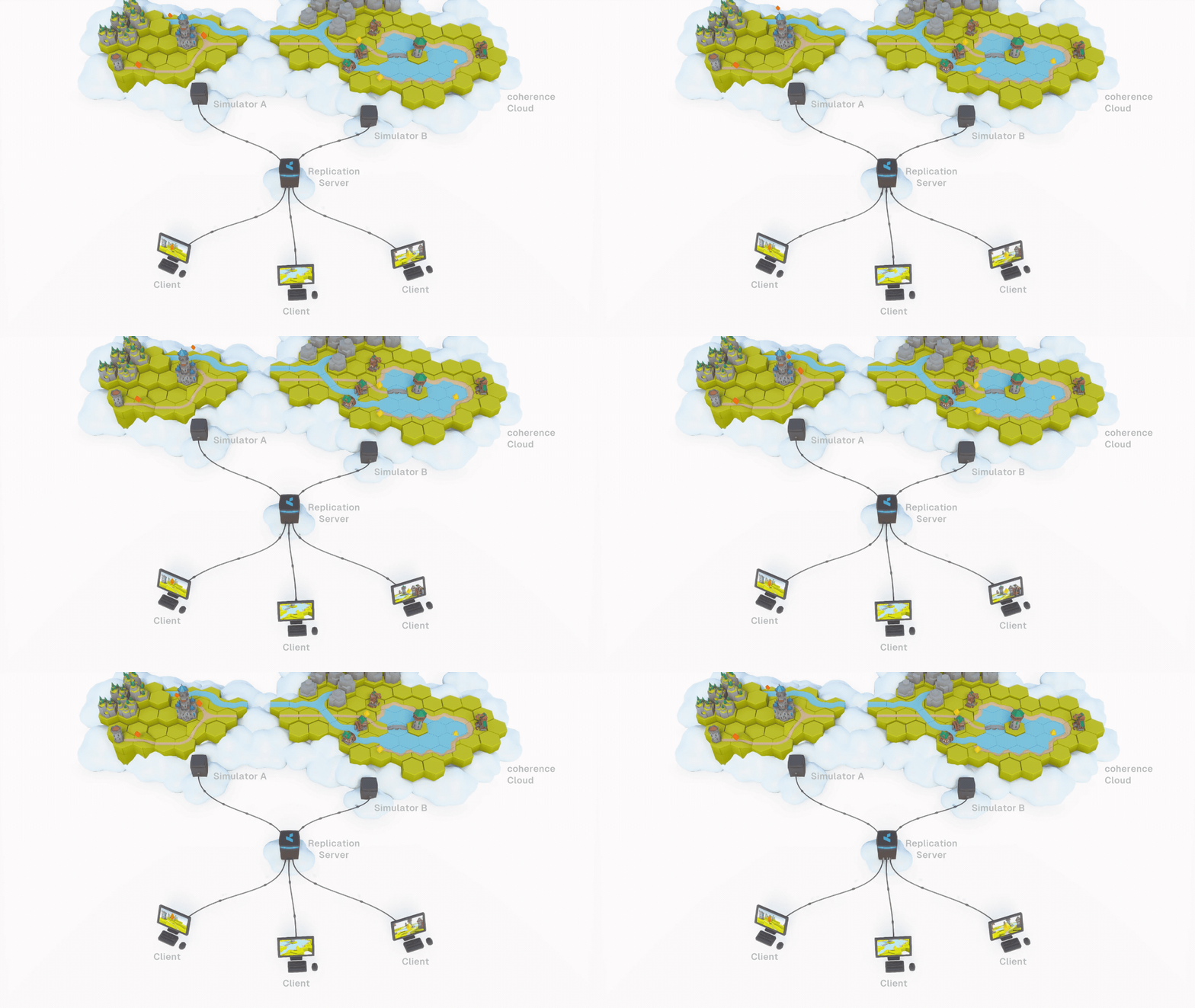
A game topology where 3 clients and 2 Simulators are connected to a coherence Replication Server
Our **network engine** is our foundational tech. It works by sharing game world data via the [Replication Server](/1.6/manual/replication-server.md) and passing it to the connected Clients. The Clients, in this context, can be regular game Clients (where a human player is playing the game) or a special version of the game running in the cloud, which we call "Simulator".
While coherence's network engine is meant to be [game engine agnostic](#user-content-fn-1)[^1], we offer SDKs to integrate with popular engines (for instance, Unity).
The **coherence Unity SDK** provides a suite of tools and pre-made Unity components, and a designer-friendly interface to easily configure [network entities](#user-content-fn-2)[^2]. It also takes care of generating netcode[^3] via a process called "Baking". In fact, simple networking can be setup completely without code.
But coherence is not just an SDK.
The [**coherence Cloud**](/1.6/hosting/coherence-cloud.md) is a **platform** that can handle scaling, matchmaking, persistence and load balancing, all automatically. And all using a handy [Dashboard](/1.6/hosting/coherence-cloud/online-dashboard.md). The coherence Cloud can be used to launch and maintain live games, as well as a way to quickly test a game in development together with remote colleagues.
For more information about how a network topology is structured in coherence, check out this video:
{% embed url="" %}
## Important concepts
### [Replication Server (RS)](/1.6/manual/replication-server.md)
A lean and performant smart relay that keeps the state of the world, and replicates it efficiently between various Simulators and game Clients.
The Replication Server usually runs in the [**coherence Cloud**](/1.6/hosting/coherence-cloud.md), but developers can start it locally from the command line or the Unity Editor. It can also be run on-premise, hosted on your servers; or be hosted by one of the Clients, to create a [peer-to-peer](/1.6/hosting/client-hosting.md) scenario (Client-hosting).
### [Simulation Server ("Simulator")](/1.6/manual/simulation-server.md)
A special version of the Game Client without graphics (a "headless client"), optimized and configured to perform server-side simulation of the game world. When we say something is simulated "server-side", we mean it is simulated on one or several Simulators.
### Game Clients
A regular build of the game. To connect to coherence, it uses our[ **SDK**](/1.6/getting-started/installation.md).
Clients (and Simulators) can define [areas of interest](/1.6/manual/optimization/areas-of-interest.md) (Live Queries), levels of detail, varying simulation and replication frequencies and other [optimization techniques](/1.6/manual/optimization.md) to control how much bandwidth and CPU is used in different scenarios.
### [**Code generation ("Baking")**](/1.6/manual/baking-and-code-generation.md)
This is the process of [generating code](/1.6/manual/baking-and-code-generation.md) specific to the game engine that takes care of network synchronization and other network-specific code. This is also known as "baking", and it's a completely automated process in coherence, triggered by just pressing a button. You can however [configure it](/1.6/manual/advanced-topics/schema-explained.md) for very advanced use cases.
### [coherence Cloud](/1.6/hosting/coherence-cloud.md)
An easy-to-manage platform for hosting and scaling the backend for your multiplayer game. The coherence Cloud can host a Replication Server, but also Simulators.
In addition, every project can have a showcase page where you can host [WebGL builds](/1.6/support/webgl.md)!
### [Online Dashboard](/1.6/hosting/coherence-cloud/online-dashboard.md)
Our cloud-backed dashboard, where you can control all of the aspects of a project, configure matchmaking, Rooms, Worlds, and keep an eye on how much traffic the project is generating.
{% hint style="success" %}
For more coherence terminology, visit the [Glossary](/1.6/support/glossary.md).
{% endhint %}
[^1]: That is not specific to any particular engine.
[^2]: An object in the simulation that is visible to all connected Clients, and whose properties are synchronised over the network.
[^3]: The part of the code of a game in charge of defining how networking behaves.