Loading...
Loading...
Loading...
Loading...
Loading...
Loading...
Loading...
Loading...
Loading...
The Coherence.Cloud.User class has been renamed to Coherence.Cloud.PlayerAccount.
The Guid property has been renamed to UniqueId to better match naming used elsewhere.
The static None property has been removed; null is now used to represent the lack of a PlayerAccount instead.
The UserId property has been renamed to Id in the following types:
PlayerAccount (formerly User).
LobbyPlayer (formerly Player).
LoginResult
LoginResponse
The Coherence.Cloud.Player struct has been renamed to Coherence.Cloud.LobbyPlayer, to avoid confusion between it and PlayerAccount, and to clarify the fact that the data relates specifically to players that are in a lobby.
The Coherence.Runtime.PlayerPayload struct has been renamed to Coherence.Cloud.MatchedPlayer, to avoid confusion between it and PlayerAccount, and to clarify the fact that the data relates specifically to players that have been matched via matchmaking.
Starting on 1.6.0, Multi-Room Simulators is deprecated and will be removed from the SDK. If your project was already using this feature, you'll still be able to work with it. But you should consider migrating your game to not use it.
Note that CoherenceScene and CoherenceSceneLoader — the core components that allows Multi-Room Simulators — are not deprecated. You can read more about them on .
Reflection Mode was a fallback mechanism that worked without requiring to bake constantly. This mechanism had flaws, limitations, and hasn't been proven as useful in its current implementation. This update completely eliminates it.
If you were using any of the APIs related to Reflection Mode (for example, CoherenceSync.UsingReflection), you should migrate your scripts now, knowing that we no longer support this bake mode anymore.
Notable API changes include:
Coherence.Network is removed now. OnConnected and OnDisconnected events are moved to IClient and have changed a signature:
BridgeStore.GetBridge is now obsolete, and will be replaced with
BridgeStore.TryGetBridge.
CoherenceSync.isSimulated is now obsolete, and will be replaced with CoherenceSync.HasStateAuthority.
CoherenceSync.RequestAuthority is now obsolete, and will be replaced with CoherenceSync.RequestAuthority(AuthorityType).
The CLI tools have been updated, especially the ones that handle Simulators. To learn more about this, see .
    private void OnEnable()
    {
        if (!BridgeStore.TryGetBridge(gameObject.scene, out CoherenceBridge Bridge))
            return;

        client = Bridge.Client;
        client.OnConnected += OnConnect;
        client.OnDisconnected += OnDisconnect;
    }

    private void OnDisable()
    {
        client.OnConnected -= OnConnect;
        client.OnDisconnected -= OnDisconnect;
    }

    private void OnConnect(ushort u)
    {
        onConnect.Invoke();
    }

    private void OnDisconnect(ConnectionCloseReason reason)
    {
        onDisconnect.Invoke();
}BridgeStore.TryGetBridge(gameObject.scene, out Bridge);Tips and best practices to upgrade the SDK while avoiding risk of data loss
If you wish to get started and install the coherence Unity SDK, please refer to the installation page.
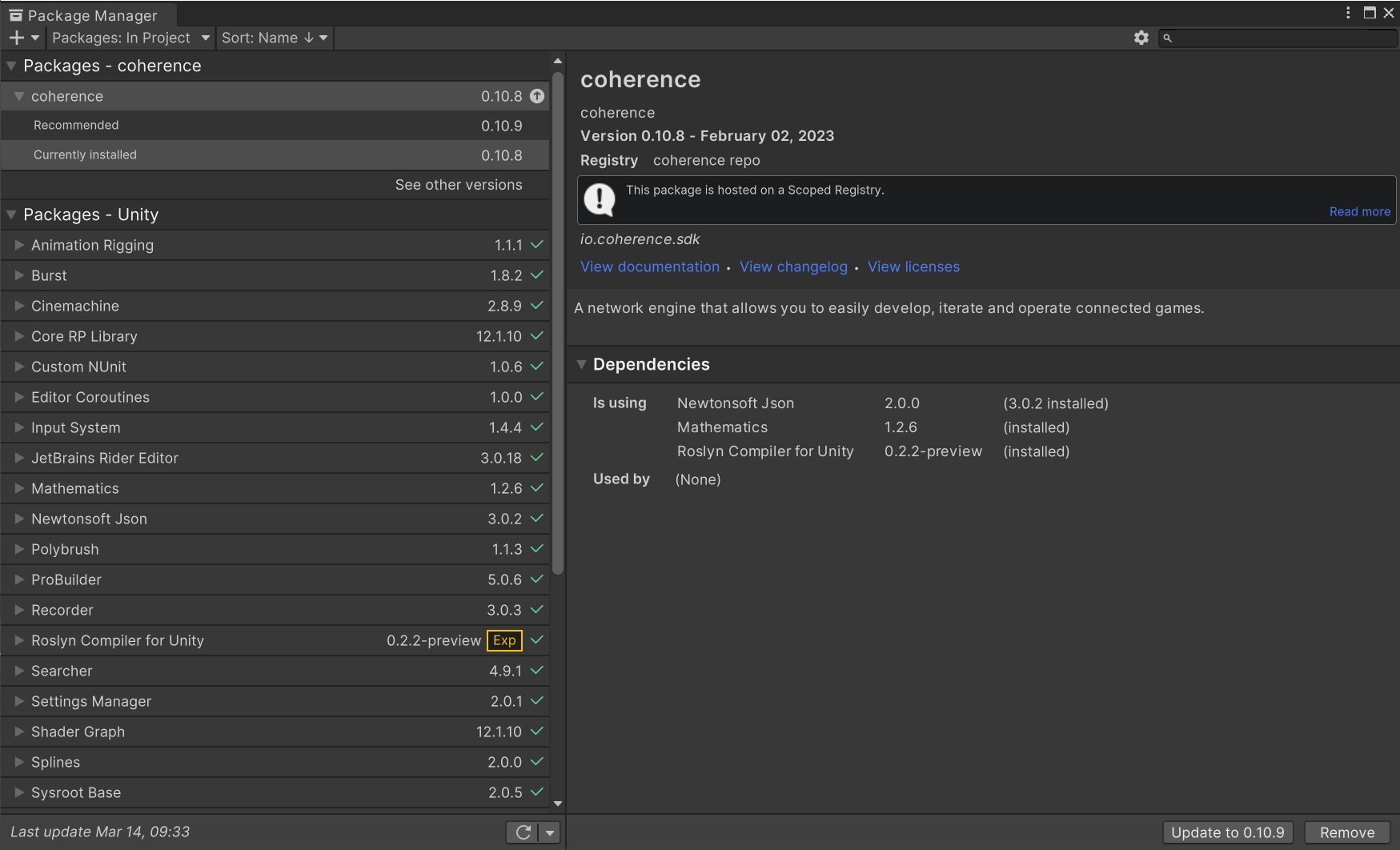
Open Unity Package Manager under Window > Package Manager and check the Packages - coherence section. It will state the currently installed version and if there are any recommended updates available:
When upgrading coherence, please do it one major or minor version at a time (considering semantic versioning, so MAJOR.MINOR.PATCH).
For example, if your project is on 0.7 and would like to upgrade to 1.0, upgrade from 0.7 to 0.8, then from 0.8 to 0.9, and so on. Always back up your project before upgrading, to avoid any risk of losing your data.
Versions prior to 0.9 are considered legacy. We don't provide a detailed upgrade guide for those versions.
Refer to the specific upgrade guides provided as subsections of this article.
Before upgrading, back up your project to avoid any data loss.
APIs marked as deprecated on 1.3 and earlier are removed on 1.5. Make sure your project is not using them before upgrading.
The MaxReached enum value of DestroyReason was renamed to MaxEntitiesReached to allow space for the new MaxQueriesReached.
Before upgrading, back up your project to avoid any data loss.
APIs marked as deprecated on 1.1 and earlier are removed on 1.3. Make sure your project is not using them before upgrading.
The GlobalQueryOn property on the Coherence.Toolkit.CoherenceBridge class has been marked as obsolete, and should no longer be used. If you had references in your code to this property, you should see warnings in your Console about this.
To fix the warnings, update your code to use the CoherenceBridge.EnableClientConnections property instead.
The instance property on the Coherence.RuntimeSettings class has been marked as obsolete, and should no longer be used. If you had references in your code to this property, you should see warnings in your Console about this.
To fix the warnings, update your code to use the RuntimeSettings.Instance property instead.
The DefaultTransportMode property on the Coherence.RuntimeSettings class was removed, and replaced with the property TransportType.
The RuntimeInterpolationSettings property on the Coherence.Toolkit.Bindings.Binding class was removed.
A new property Interpolator was added to Coherence.Toolkit.Bindings.ValueBinding, offering comparable binding interpolation functionality.
The Mask property was removed from the Coherence.Entities.ComponentChange struct.
The same value can be acquired using ComponentChange.Data.FieldsMask instead.
The Coherence.ChannelID struct was moved into the Coherence.Common assembly.
If you get compile errors about this type not being found, make sure that your has a reference to the Coherence.Common assembly.
Before upgrading, back up your project to avoid any data loss.
APIs marked as deprecated on 1.2 and earlier are removed on 1.4. Make sure your project is not using them before upgrading.
We've greatly simplified the AuthClient API which should make it much easier to use and much harder to get wrong.
Part of the changes is moving the responsibility of storing the guest login credentials to the consumer of the AuthClient.
All Login methods return a LoginResult object which contains credentials required for further sign-ins, including the SessionToken which was previously stored in the AuthClient. It is in caller's best interest to store those credentials so they can be reuse in the next session.
Example of a new sign up / sign in flow:
The new AuthClient API looks as follows:
async Task<bool> SignUp(AuthClient authClient, string username, string password)
{
    LoginResult loginResult = await authClient.LoginWithPassword(username, password, autoSignup: true);
    if(loginResult.Type != Result.Success)
    {
        // ... handle failure
        return false;
    }

    // Custom token saving function
    SaveSessionToken(loginResult.SessionToken);
    return true;
}

async Task<bool> SignIn(AuthClient authClient)
{
    // Custom token loading function
    var sessionToken = LoadSessionToken();
    if(sessionToken == null)
    {
        // ... handle failure
        return false;
    }

    LoginResult loginResult = await authClient.LoginWithToken(sessionToken);
    return loginResult.Type == Result.Success;
}event Action<LoginResponse> OnLogin;
event Action OnLogout;
event Action<LoginError> OnError;
bool LoggedIn { get; }
Task<LoginResult> LoginAsGuest();
Task<LoginResult> LoginWithPassword(string username, string password, bool autoSignup);
Task<LoginResult> LoginWithToken(SessionToken sessionToken);
void Logout();
void Dispose();Before upgrading, back up your project to avoid any data loss.
APIs marked as depracted on 1.0 and earlier are removed on 1.2. Make sure your project is not using them before upgrading.
There has been a major refactor on how we deal with the registry.
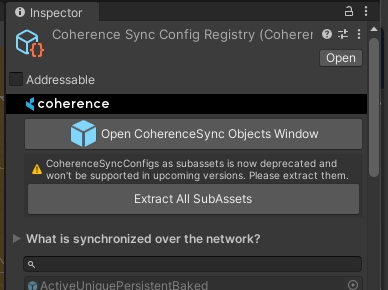
First off, we're deprecating the registry holding configs as sub-assets.
This has been the default up to 1.1, but on 1.2, it has been changed to store the configs in the
📁 Assets/coherence/CoherenceSyncConfigs folder.
For 1.2, we have avoided manual migration of existing sub-assets. You can trigger this operation from the registry inspector (Assets/coherence/CoherenceSyncRegistry). We don't automate this operation, since the extraction changes the asset GUIDs of the configs, which could lead to missing references. This is specially true if your project is referencing the configs directly, instead of going through the registry. Keep this in mind when you decide to extract existing sub-assets.
It is important that you perform the forementioned migration as soon as possible, since SDK will be deprecating reading from sub-assets in upcoming releases.
The APIs provided have changed too. Check , and . Exposed functionality has been documented.
When the package imports, if there are any compilation errors, Unity won't do a . This means the previous package is still in memory and executing, but the contents of the package (might) have changed drastically. This can yield numerous errors and warnings on the Console, that will fade away once the compilation (followed by a domain reload) is completed.
If, after compilation, you are still experiencing issues using the SDK (errors hitting the Bake button, the CoherenceSync component throwing exceptions or warnings that weren't there before the upgrade, etc.), please reach out to us on our or the .
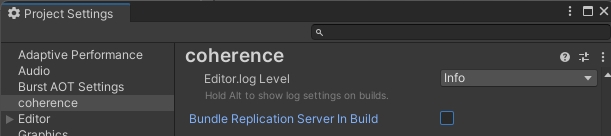
In this update, bundling the Replication Server has been revamped to work with Streaming Assets. On the Settings window, instead of different toggles per platform, there's now one unified toggle:
Sample UI
coherence / Explore Samples / Connection Dialog(s)
CoherenceSyncConfigManager
Source Generator baking strategy
Falls back to Assets baking strategy
This page lists changes in coherence 1.0.0 version which might affect existing projects when upgrading from a 0.10.x version to 1.0.0.
Version 1.0.0 includes breaking changes to the baked scripts, which means your current ones will cause compilation errors. It is recommended to delete your current baked scripts under Assets/coherence/baked before performing a coherence Unity SDK update.
For automatic migrations to run smoothly, we recommend not having any Prefab with missing component scripts that have the CoherenceSync component attached to it. These Prefabs will stop Unity from saving assets and automatic data migrations might get interrupted because of it.
There have been a number of updates to the old CoherenceMonoBridge, which have resulted in a rebranding of the component to CoherenceBridge.
If your custom scripts have references to the class CoherenceMonoBridge, you will have to rename all these references to CoherenceBridge.
The script asset GUID and the public API of the component remain unchanged, so asset references to CoherenceMonoBridge components should remain intact.
In coherence 1.0.0, we have revamped our asset management systems to make them more scalable and customizable, both in Editor and in runtime. Read more about the new implementations and the possibilities in the article.
Upon upgrading the SDK, a new CoherenceSyncConfigRegistry asset will be automatically created in 📁 Assets/coherence/CoherenceSyncConfigRegistry.asset and populated with sub-assets for each of your Prefabs that have a CoherenceSync component attached.
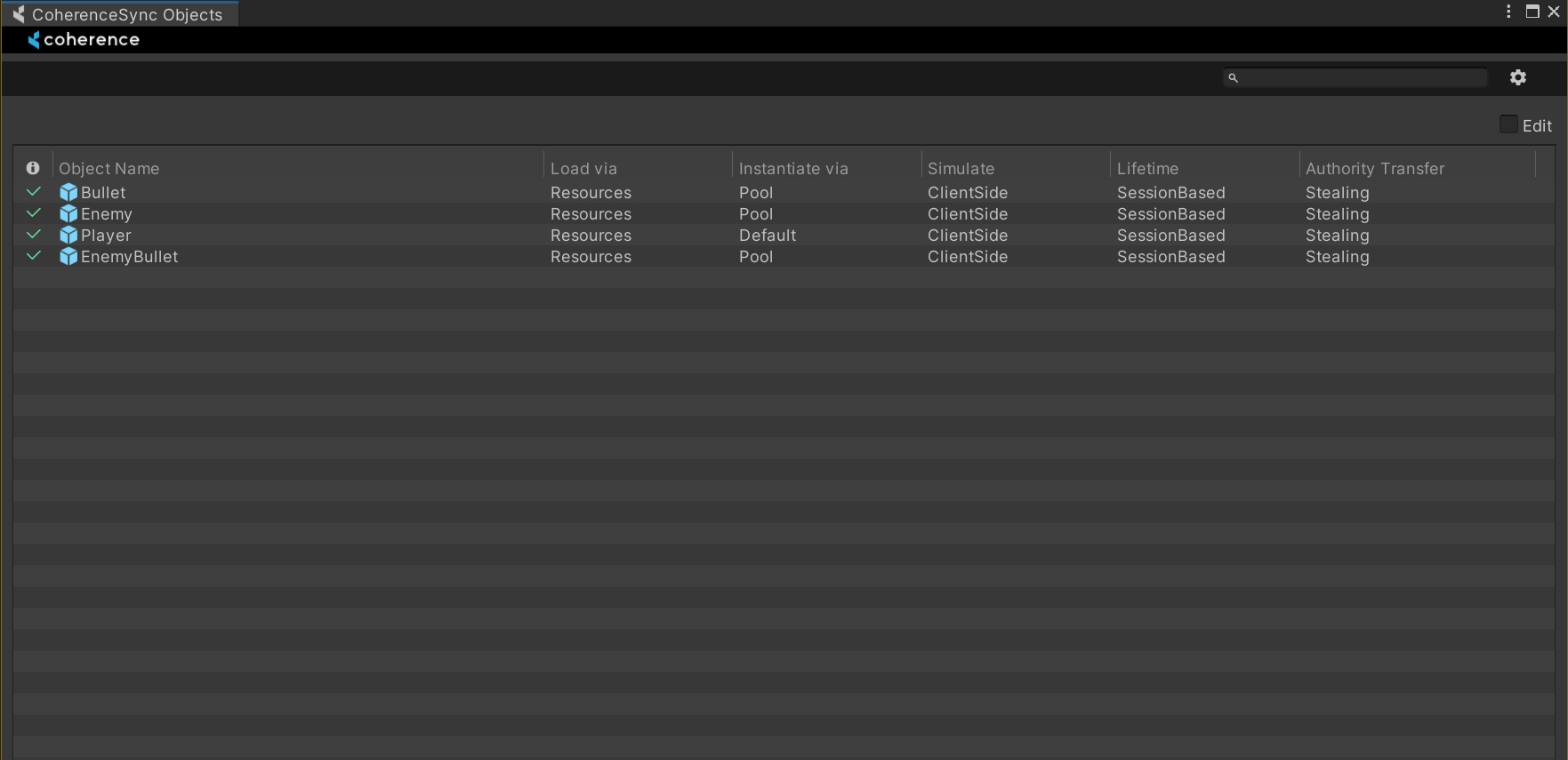
If the automatic migration completed successfully, you can browse all your networked Prefabs in the new CoherenceSync Objects window found under the coherence menu item:
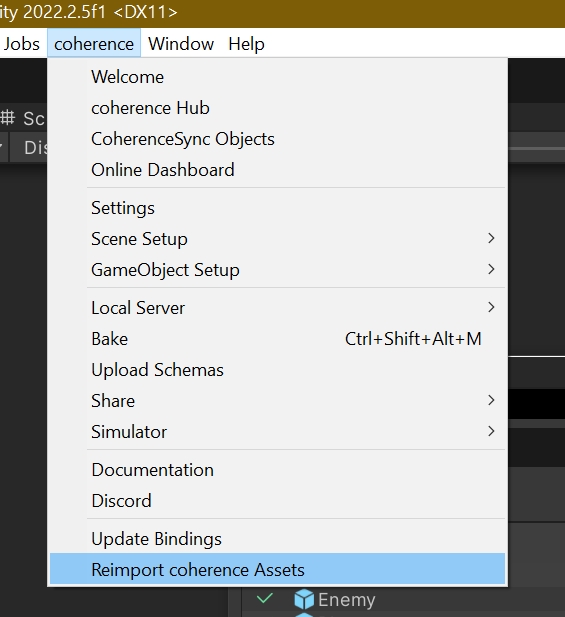
If something has gone wrong during the automatic migration, you can restart the process by deleting the current CoherenceSyncConfigRegistry asset, and selecting the Reimport coherence Assets option under the coherence menu item. This will automatically create a config entry for each of your CoherenceSync Prefabs:
In previous versions of coherence, Prefabs with the CoherenceSync component would be automatically synced over the network in the Start method, and they would stop being synced only when destroyed. This prevented us from supporting things like object pooling and reusing the same CoherenceSync instance to represent different network entities across its lifetime.
As a result, CoherenceSync instances are now automatically synced and unsynced with the network in the OnEnable and OnDisable methods of the MonoBehaviour. This means you can disable the GameObject instance in the hierarchy and it will stop being synced, you can also keep the local visual representation by only disabling the CoherenceSync component.
You can learn more about the CoherenceSync lifetime cycle in the page.
The Play API was the public API we offered to connect with your coherence Cloud project in runtime. It has been deprecated in favor of a new non-static API called CloudService, with separation of a ReplicationServerRoomsService so you can talk to self-hosted Room Replication Servers with a lot more customization and without having to use the coherence Cloud.
The Play API includes the following classes:
PlayResolver
PlayClient
Play
WorldsResolverClient
If you were using PlayResolver static calls, you can now access CloudService instance from CoherenceBridge instead, and you will be able to use the CloudService.Worlds or CloudService.Rooms instances to fetch Worlds or to create, delete or fetch available Rooms respectively.
CloudService offers callback-based methods and an async variant for all of the available requests.
You can learn more about the Cloud Service API under the section.
No Domain Reload is a Unity Editor option that allows users to enter Play mode very fast without having to recompile all your code. This wasn't properly supported in earlier versions of coherence, but now it is!
You can find this option under Edit > Project Settings > Editor > Enter Play Mode Settings.
In previous releases of coherence, this event would be fired strictly for CoherenceSync Prefab instances created by coherence, which means it would be fired for instances you didn't have authority over.
In 1.0, this event will be fired for every instance of CoherenceSync that starts being synchronized over the network.
If you wish to hook behavior to non-authority instances, please use the OnStateRemote event instead, which is fired when a CoherenceSync instance is non-authoritative.
In 1.0, there has been two major changes to Client Connection instances.
Client Connection instances now live in the DontDestroyOnLoad scene. Since now we support , and Client Connections instances are managed by coherence, they need to survive the destruction of the Scene they were in.
References to the Client Connection Prefab in the CoherenceBridge Component have been changed from hard referencing a Unity Prefab, to referencing a asset. If you were using a Unity Prefab reference, it still exists serialized but is deprecated. If you wish to stop using the Unity Prefab reference, please delete the CoherenceBridge Component and add it again.
RoomsResolverClient
using Coherence.Entity; -> using Coherence.Entities;
It is recommended to switch to Assets strategy before upgrading. If you upgrade while using the Source Generator, you might see an error popup, guiding you to switch back to Assets. After the upgrade and a clean Bake, you can switch back to Source Generators baking strategy.