coherence makes it easy to instantiate networked objects. If you instantiate a networked Prefab while the game is running, it automatically instantiates on all connected clients. You don't need to do anything else to make it happen.
However some rules apply, so read on to understand more about the process.
It is important to understand that coherence has no concept of a "player Prefab" that maps 1:1 with each Client. Clients can control only one network entity, multiple, or none at all.
Clients can also trade authority over them at runtime. For example, a Client might initially have authority over a character, which can then move to another Client during gameplay.
It's up to you to decide what constitutes a "player Prefab": you can instantiate one before connecting, right after connection, or at any point during the simulation. You can even just leave it in the scene, and let each player bring a copy of that into the simulation (in this case, make sure the Prefab is not set to be !).
Finally, if you come from other networking frameworks, you might expect a player Prefab to be be instantiated by the network manager (in coherence, the ), but that is not the case. Like all other network entities, it can be instantiated by any script.
You can instantiate a networked Prefab in the following ways:
Use GameObject.Instantiate(), and provide a reference to the Prefab:
Simply include the Prefab in a scene.
(Editor only, for testing) Drag the Prefab from the Project window to the scene or to the Hierarchy while the game is running.
In all of these cases, the Prefab will be immediately instantiated on all other connected clients and Simulators.
Just ensure to include a CoherenceSync component on the Prefab, and that netcode is correctly.
Whoever instantiates a Prefab gets full over it. All other clients will see it as remote.
You cannot directly instantiate an entity owned by another Client. The Client that instantiates a Prefab automatically has authority over it.
However, you can transfer authority immediately after instantiation. In code:
(to get other clients' IDs you need to have enabled)
This is a perfectly valid strategy to have a Simulator spawn player characters for connected Clients.
To destroy a networked Prefab, simply invoke GameObject.Destroy() on it. coherence will automatically destroy all remote copies.
Keep in mind is that only whoever has State authority over it can destroy an entity. If someone else does it, they will get a warning in the console.
Clients cannot directly destroy entities they don't have authority over. Instead, you may:
Send a to ask the owner to destroy it. In code:
Take authority over the entity first, then destroy it locally. This is slightly slower as it implies a full roundtrip (request > response > destruction), but it's a viable option if the requester needs to verify whether the entity can be destroyed at all. You can implement the conditions under which the other client will . In code:
Note that we're assuming that the request above always succeeds, and we're not implementing any approval/denial code for the sake of simplicity.
In coherence, you can take full control of how network entities are instantiated.
A typical use for custom instantiation is streaming assets in with the , which coherence is fully integrated with. Another typical use case is .
To use custom instantiation you can't just hard reference the Prefab and invoke Instantiate() or Destroy() as described above. Instead, you have to to let the chosen instantiator script take over and perform custom operations.
We natively support object pooling, so that newly requested entities don't just get created from scratch, but they are taken from a pre-existing pool.
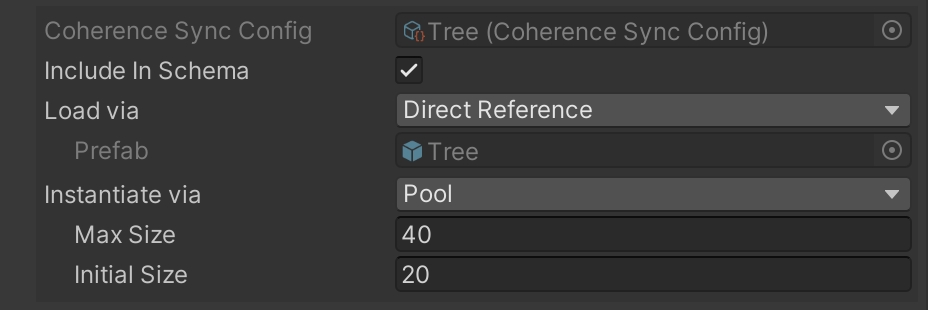
In the CoherenceSync component inspector, you will find an option called Instantiate Via.
Select the option called Pool, and define the initial and max size of the pool:
When the game starts, coherence will automatically create a pool of disabled instances of this Prefab in the DontDestroyOnLoad scene. It will then activate these for new remote entities that use this Prefab that other clients created.
If you want to take from the same pooling system to instantiate your own local/authoritative entities, you can do so by using the corresponding to your Prefab. If you reference this asset, you will be able to : these methods will use the underlying pool implementation to do so.
When remote entities are removed or go out of a , they will be automatically deactivated and move back into the pool.
If you already have a pooling system in place (even a third-party asset!) and you would like remote objects to leverage it, you can hook your own pool into a custom instantiator using the INetworkObjectInstantiator interface. This is described in the .
GameObject newGameObject = Instantiate(prefab);// Instantiates a Prefab and immediately gives authority away
public void SpawnAndTransfer(GameObject prefab, ClientID recipientID)
{
GameObject newGameObject = Instantiate(prefab);
newGameObject.GetComponent<CoherenceSync>().TransferAuthority(recipientID);
}private void DestroyNetworkEntity(GameObject objectToRemove)
{
CoherenceSync sync = objectToRemove.GetComponent<CoherenceSync>();
if (sync.HasStateAuthority)
{
// If we have authority, no need to send a command
Destroy(objectToRemove);
}
else
{
// Change MyBehaviour here to whatever type will receive the Command
sync.SendCommand<MyBehaviour>(nameof(MyBehaviour.RemoveObject),
MessageTarget.AuthorityOnly);
}
}// The command invoked on the receiving end
[Command]
public void RemoveObject()
{
Destroy(this.gameObject);
}private void RequestDestroy(GameObject objectToRemove)
{
CoherenceSync sync = objectToRemove.GetComponent<CoherenceSync>();
if (sync.HasStateAuthority)
{
Destroy(objectToRemove);
}
else
{
// Listen to authority transfer
sync.OnStateAuthority.AddListener(() => Destroy(objectToRemove));
sync.RequestAuthority(AuthorityType.Full);
}
}