> For the complete documentation index, see [llms.txt](https://docs.coherence.io/llms.txt). Markdown versions of documentation pages are available by appending `.md` to page URLs; this page is available as [Markdown](https://docs.coherence.io/1.7/hosting/coherence-cloud/configure-rooms.md).
# Configure Rooms
From the Online Dashboard, you can configure how Rooms are created through the SDK in the coherence cloud.

From the left sidebar, select *Rooms*. On this page you can:
* choose the regions you want to allow your rooms to be created in
* enable Simulators for your Rooms
* view a list of recently created Rooms
* view a list of recently uploaded Simulators
### Simulators
From the Online Dashboard, you can configure what size you want your [Simulator](/1.7/manual/simulation-server.md) instances to be. To attach a Simulator to a Room, send the ["Simulator slug"](/1.7/manual/simulation-server/simulator-slugs.md) uploaded through the SDK with the Rooms creation request. When using the [Unity Cloud Service API](/1.7/hosting/coherence-cloud/coherence-cloud-apis.md) to create Rooms, the Simulator uploaded through the SDK is automatically assigned in the creation request.
### Replication Server & Send Frequency
The packet frequencies for sending and receiving data can be adjusted per project. It is part of the *Advanced Config* section and adjusting the frequencies is available only for paid plans.
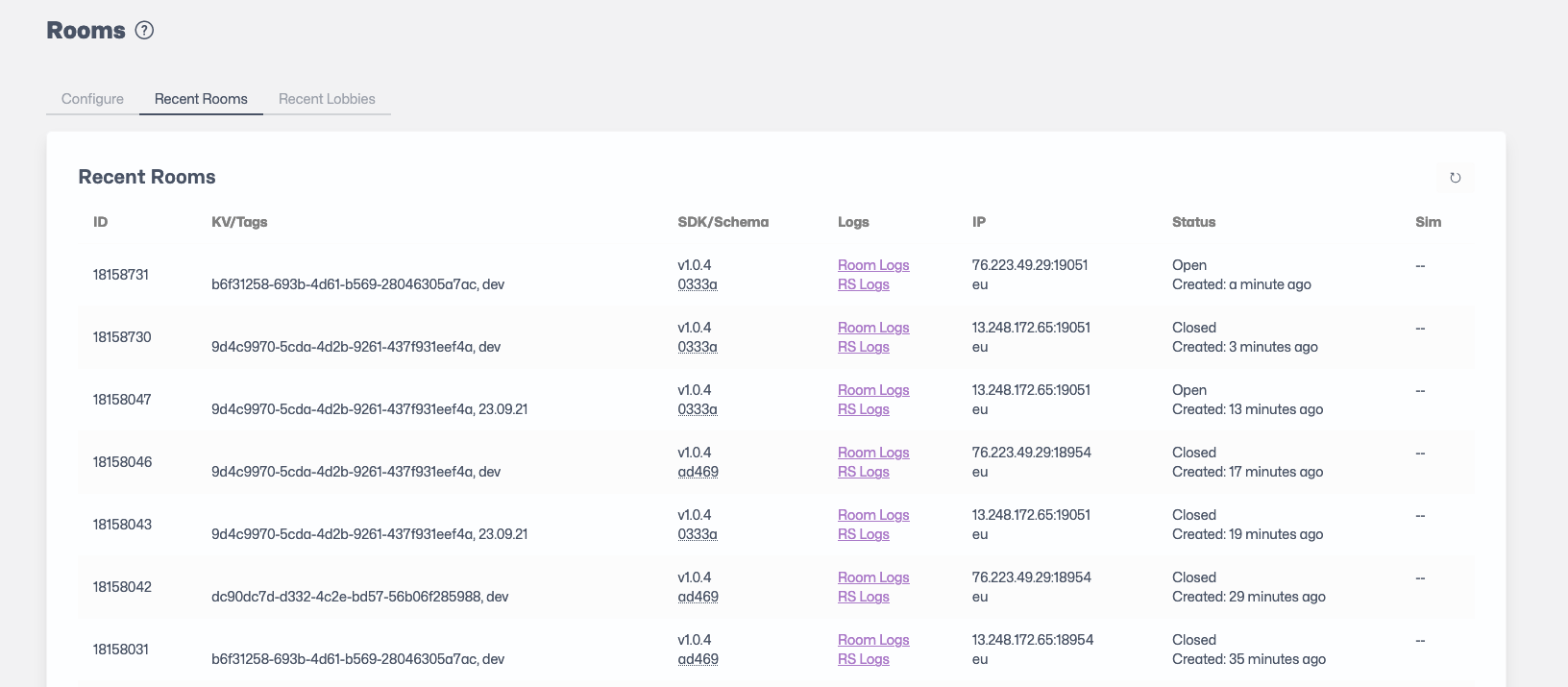
### Recent Rooms Table
Recent Rooms view.
The Recent Rooms Table provide a quick view of the recently created Rooms with the following information per column:
| Column name | Description |
| ------------------- | --------------------------------------------------------------------------------------------------------------------------------------------------------------------------------------------------------------------------------------------------------------------------------------------------------------------------------------------------------------------- |
| **ID** | ID of the Room. |
| **KV/Tags** | Key-value pairs associated with the Room, followed by Tags attached to the Room. |
| **SDK/Schema** | SDK version used by the Room, followed by the Schema ID used by the Room. |
| **Logs** | Allows viewing Room logs and Replication Server (RS) logs. |
| **IP** | IP address of the Replication Server attached to the Room, followed by a region indicator. |
| **Room** **Status** | Status of the Room (Open or Closed). |
| **Created** | Time duration since the Room creation. |
| **Sim Status** | Status of the Simulator attached to the Room (Starting, Started, Stopped). |
| **Sim** | Sim Slug for the Room. |
| **Messages** |
Messages from the Simulator orchestration. This field is usually empty but will contain a message if an issue happened with the Simulator life-cycle. The message provides the reason for the Simulator's current state (usually Stopped). Once a Simulator is stopped (for Room inactivity for instance), the Message column will mention Idle-stopped.
|
### Creating, Fetching and Joining Rooms in Unity
Please refer to the [Cloud Service API: Rooms](/1.7/hosting/coherence-cloud/coherence-cloud-apis/rooms.md) section.
### Closing Rooms
Rooms are automatically closed within a few minutes after the last player has left the room. This can be changed in the *Advanced Config* section.
### Current Limits
{% hint style="info" %}
Current limits for Rooms are as follows:\
\
**Players**
The default setting is 10 players hosted, but you can specify your own value anywhere **between 2 and 100 players**.
To support more than a 100 players per room, write to ****
**Entities**
**1000 by default**, but can be increased up to 65535 in local development or client-hosted scenarios.
There is no UI button for increasing the supported player count, so you need to work through our [Rooms API](/1.7/hosting/coherence-cloud/coherence-cloud-apis/rooms.md).
When creating a room via`ReplicationServerRoomsService.CreateRoom` you can pass `SelfHostedRoomCreationOptions` as creation options.\\
To change the Entity limit just set the `SelfHostedRoomCreationOptions.MaxEntities` to a desired value.
{% endhint %}