# CoherenceBridge

The Bridge establishes a connection between your scene and the coherence [Replication Server](https://docs.coherence.io/1.7/manual/replication-server). It makes sure all networked entities stay in sync.

When you place a GameObject in your scene, the Bridge detects it and makes sure all the synchronization can be done via the `CoherenceSync` component.

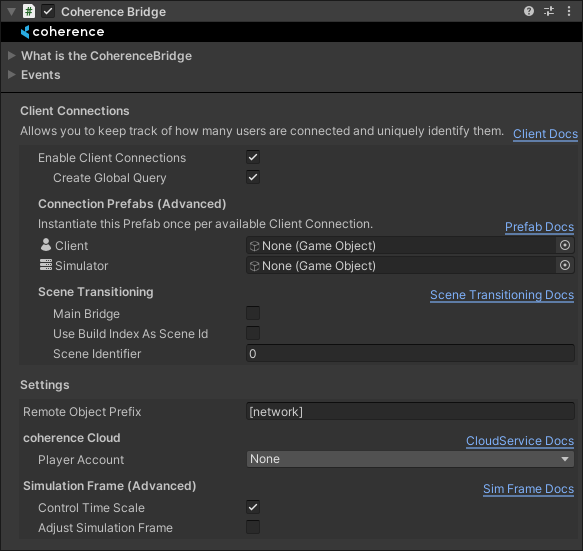
<figure><img src="https://content.gitbook.com/content/NGFZGdbLA4bzHQXTuDMT/blobs/xPlmBPnoM63psmjPdLVD/image.png" alt=""><figcaption><p>coherence Bridge Inspector</p></figcaption></figure>

At runtime, you can inspect which Entities the Bridge is currently tracking.

![coherence Bridge Inspector at runtime](https://content.gitbook.com/content/NGFZGdbLA4bzHQXTuDMT/blobs/yhHsgBmALH5Mo1lmC8KO/Screenshot%202023-04-25%20154800.png)

A Bridge is associated with the scene it's instantiated on, and keeps track of Entities that are part of that scene. This also allows for multiple connections at the same time coming from the game or within the Unity Editor.

You can use [CoherenceBridgeStore.TryGetBridge](https://unityapi.coherence.io/docs/api/Coherence.Toolkit.CoherenceBridgeStore.html#Coherence_Toolkit_CoherenceBridgeStore_TryGetBridge_UnityEngine_SceneManagement_Scene_Coherence_Toolkit_CoherenceBridge__) to get a CoherenceBridge associated with a scene:

<pre class="language-csharp"><code class="lang-csharp"><strong>if (CoherenceBridgeStore.TryGetBridge(gameObject.scene, out var bridge))
</strong><strong>{
</strong><strong>    Debug.Log("Bridge found");
</strong><strong>}
</strong></code></pre>

### Unity Events

The CoherenceBridge offers a couple of Unity Events in its inspector where you can hook your custom game logic:

#### OnLiveQuerySynced

This event is invoked when the Replication Server state has been fully synchronized, it is fired after OnConnected.

For example, if you connect to a ongoing game that has five players connected, when this event is fired all the entities and information of all the other players will already be synchronized and available to be polled.

#### OnConnected

This event is invoked the moment you stablish a connection with the Replication Server, but before any synchronization has happened.

Following the previous example, if you connect to an ongoing game that has five players connected, when this event is fired, you won't have any entities or information available about those five players.

#### OnDisconnected

This event is invoked when you disconnect from a Replication Server. In the parameters of the event you will be given a ConnectionCloseReason value that will explain why the disconnection happened.

#### OnConnectionError

This event is invoked when you attempt to connect to a Replication Server, but the connection fails, you will be returned a ConnectionException with information about the error.

### Client Connections

The Client Connections system allows you to keep track of how many users are connected and uniquely identify them, as well as easily send server-wide messages.

You can read more about the **Client Connections** system [here](https://docs.coherence.io/1.7/manual/client-connections).

### Connecting to Worlds/Rooms from coherence Cloud

If you have a [developer account](https://docs.coherence.io/1.7/hosting/coherence-cloud/online-dashboard) and have [logged in](https://docs.coherence.io/1.7/hosting/coherence-cloud/authentication-service-player-accounts), you can connect to Worlds or Rooms hosted in the coherence Cloud. After you fetch a valid World or Room using [cloud services](https://unityapi.coherence.io/docs/v1.6.0/api/Coherence.Cloud.PlayerAccount.Services.html), you can use the JoinWorld or JoinRoom methods to easily connect your Client.

You can read more about the **coherence Cloud Service** [here](https://docs.coherence.io/1.7/hosting/coherence-cloud/coherence-cloud-apis).

{% hint style="info" %}
Read more about the coherence Cloud Service.
{% endhint %}


---

# Agent Instructions: Querying This Documentation

If you need additional information that is not directly available in this page, you can query the documentation dynamically by asking a question.

Perform an HTTP GET request on the current page URL with the `ask` query parameter:

```
GET https://docs.coherence.io/1.7/manual/components/coherence-bridge.md?ask=<question>
```

The question should be specific, self-contained, and written in natural language.
The response will contain a direct answer to the question and relevant excerpts and sources from the documentation.

Use this mechanism when the answer is not explicitly present in the current page, you need clarification or additional context, or you want to retrieve related documentation sections.
