# Networking Voice

coherence offers realtime voice networking through a proven solution: [Dissonance Voice](https://placeholder-software.co.uk/dissonance/) by [Placeholder Software](https://placeholder-software.co.uk/). It can be obtained through the [Asset Store](https://assetstore.unity.com/packages/slug/70078).

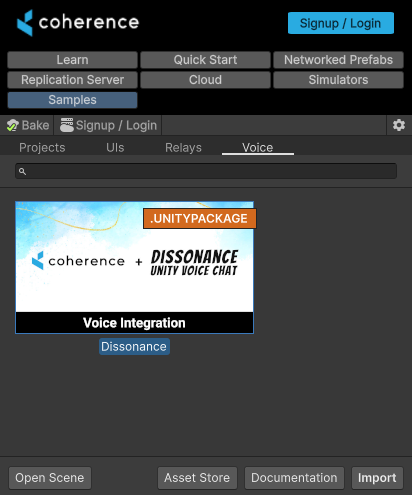
<figure><img src="https://content.gitbook.com/content/CMCtKgV0bk1lwR4tWK3W/blobs/9uPnu4ampf68WiJs2IUa/image.png" alt=""><figcaption><p>You can find the coherence + Dissonance integration within <code>coherence > Hub > Samples</code>.</p></figcaption></figure>

{% hint style="info" %}
You need a copy of Dissonance on your project for this integration to work.
{% endhint %}

{% hint style="success" %}
In the future, there might be other voice integrations available. If you'd like to see support for a solution you're fond of, reach out to us!
{% endhint %}

Once imported, `Assets/Dissonance/Integrations/Coherence` contains the integration and a demo scene.

Here's a breakdown of the components this integration offers. [Further down](#setup-from-scratch) we walk through a practical setup.

<table><thead><tr><th width="255">Class / Unity Component</th><th>What it does</th><th>How to use it</th></tr></thead><tbody><tr><td>CoherenceCommsNetwork</td><td>The core of the integration. Runs Dissonance as Server+Client (Host) or Client. To decide in which mode to run, it relies on <a href="authority">authority</a>.</td><td>Create a networked prefab with this component attached. Whoever has authority over it, will be the server.</td></tr><tr><td>CoherenceSyncVoice</td><td>Defines the networked entity associated with each client. To do this, it relies on <a href="client-connections">Client Connections</a>.</td><td>Create a networked prefab with this component attached, and reference it as a Client Connection Prefab on your CoherenceBridge. Each client on the network will send data to the server through this entity.</td></tr><tr><td>CoherencePlayer</td><td>Implements a <a href="https://placeholder-software.co.uk/dissonance/docs/Tutorials/Custom-Position-Tracking.html#how-dissonance-tracks-players">Dissonance Player</a>, used for 3D and proximity audio processing.</td><td>Add to your networked player.</td></tr></tbody></table>

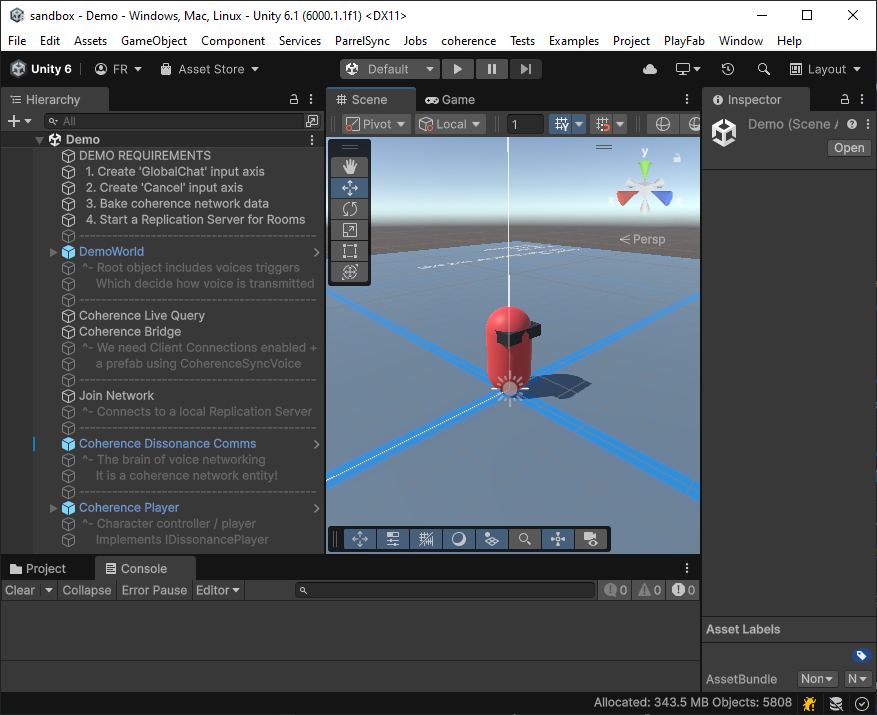
The demo project, found in `Assets/Dissonance/Integrations/Coherence/Demo` , showcases how all these pieces work in conjunction. The scene `Demo` describes within the hierarchy each of the pieces.

<figure><img src="https://content.gitbook.com/content/CMCtKgV0bk1lwR4tWK3W/blobs/kE8T6AHAVIOHrITPO8sh/image.png" alt=""><figcaption></figcaption></figure>

## Setup from scratch

If you prefer to set up voice networking from scratch, here's how to do it. You will need:

* A networked prefab that acts as the server
* A networked prefab that acts as the client
* (Optional) if you want proximity-based voice, a Networked Prefab that acts as the player

### Server (via CoherenceCommsNetwork)

Create a GameObject and attach CoherenceCommsNetwork to it. This automatically adds CoherenceSync and DissonanceComms.

Now, convert it into a prefab. You can do this by clicking on the *Sync with coherence* header, through the CoherenceSync inspector, or just by dragging it somewhere from the Hierarchy window into the Project window.

This prefab will represent our voice server. Keep it on the scene, or instantiate it at the time you want to start the Dissonance voice network.

On the CoherenceSync component, change the Lifetime to Persistent, and enable Auto-adopt Orphan. This allows the voice server to be adopted by someone else if the host disconnects.

{% hint style="success" %}
In the demo content, this Prefab is called `Coherence Dissonance Comms` .
{% endhint %}

### Client (via CoherenceSyncVoice)

Create a GameObject and attach CoherenceSyncVoice to it. This automatically adds CoherenceSync.

Now, convert it into a prefab. You can do this by clicking on the *Sync with coherence* header, through the CoherenceSync inspector, or just by dragging it somewhere from the Hierarchy window into the Project window.

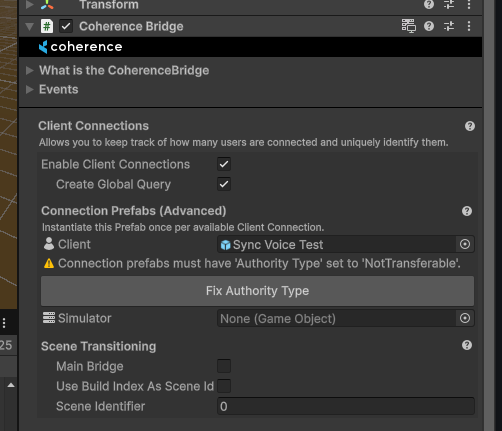
This Prefab will represent our voice client. Don't instantiate this yourself. Instead, reference it on your [CoherenceBridge](https://docs.coherence.io/manual/components/coherence-bridge) component as a client connection prefab.

<figure><img src="https://content.gitbook.com/content/CMCtKgV0bk1lwR4tWK3W/blobs/qd5ZrqGWeSh6rWuoiFym/image.png" alt=""><figcaption><p>Fix any problems when referencing a client connection prefab. In this case, it's suggesting to disable authority transfer, since that's not supported by <a href="client-connections">Client Connections</a> (Client Connections are a special kind of entity, handled by the Replication Server).</p></figcaption></figure>

{% hint style="success" %}
In the demo content, this prefab is called `Coherence Sync Voice` .
{% endhint %}

### Player (via CoherencePlayer)

Attach CoherencePlayer to the root of your player prefab, which should be a networked prefab.

If your player isn't networked yet, attaching this component will also attach a CoherenceSync.

This Prefab will now report position to Dissonance, to allow proximity-based voice.

{% hint style="success" %}
In the demo content, this prefab is called `Coherence Player` .
{% endhint %}

### Voice Triggers

You will need [Voice Broadcast Trigger](https://placeholder-software.co.uk/dissonance/docs/Reference/Components/Voice-Broadcast-Trigger.html) (when and where voice is sent to) and [Voice Receive Trigger](https://placeholder-software.co.uk/dissonance/docs/Reference/Components/Voice-Receipt-Trigger.html) (what we listen to) components.

### That's all folks

From here on, you can start to experiment with voice. Make sure to keep reading through [Dissonance's Documentation](https://placeholder-software.co.uk/dissonance/docs/) for further insights into voice support.