> For the complete documentation index, see [llms.txt](https://docs.coherence.io/llms.txt). Markdown versions of documentation pages are available by appending `.md` to page URLs; this page is available as [Markdown](https://docs.coherence.io/1.2/known-issues-and-troubleshooting.md).
# Known Issues and Troubleshooting
Common problems and how to fix them
### Byte arrays don't sync when changing values by index
When binding a `byte[]` field, the field will not be synced when changed by `someField[x] = y`.\
The only way to actually update the field, is through `someField = new byte[]...` which assigns a new reference.
### Warning messages when running GGPO network rollback
We have identified a **misprediction bug** in coherence 1.1.3 and earlier versions that causes a **failed rollback** right after a new Client joins a session, throwing relevant error messages. However if the Client manages to connect, this won't affect the rest of the simulation.\
\
The fix should ship in the next release.
### Warnings about missing hashes
If you're getting errors such as the ones below, the issue is that your Prefab has multiple AnimationControllers, but **coherence** only supports **a single** AnimationController.
> Parameter 'Hash 1963678224' does not exist.
> CoherenceSync: We can't find any binding for component 'GenericFieldQuaternion0' when receiving a component update.
{% hint style="info" %}
If you still need multiple AnimationControllers, a workaround is detailed in the[ Animations](/1.2/coherence-sdk-for-unity/networking-state-changes/animation.md) article.
{% endhint %}
Or see an error on saving a Prefab from the sample:
```
Error while saving Prefab: 'Assets/Samples/coherence/1.1.1/Connect Dialog_ Rooms/Room Connection Dialog.prefab'. You are trying to save a Prefab that contains the script '', which does not derive from MonoBehaviour. This is not allowed.
Please change the script to derive from MonoBehaviour or remove it from the GameObject 'Room Connection Dialog'.
UnityEditor.EditorApplication:Internal_CallUpdateFunctions ()
```
Delete the sample itself (mind any modifications you might have done), close Unity and delete the `Library` folder. Note that by doing so you're forcing a **reimport of all your assets**, which might take time depending on your project size.
### Changing parent teleports the Entity to world zero for a frame
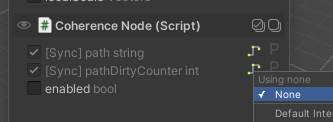
When using CoherenceNode on your CoherenceSync, if CoherenceNode's networked variables have interpolation applied, you'll experience this issue. **Turn off interpolation** for such variables.
### CoherenceSync Prefab instances on the scene not appearing when using "No Duplicates" uniqueness setting
This can happen if **coherence** fails to set a Unique ID on your scene instances. Check the CoherenceSync inspector on Prefab instances. Look for `Prefab Instance Unique ID`. Click the button to generate an ID. Do this for every Prefab instance that is missing its ID.
Alternatively, you can set a Manual Unique ID of your own on the Prefab itself or per-Prefab instance on your scene.
### Types missing the `ExtensionOfNativeClass` attribute
Reimport assets via menu item `Assets / Reimport All`.
### Scripts losing references to Prefabs, Fix Serialized Data button appears
There is [a bug](https://issuetracker.unity3d.com/issues/prefab-asset-fileids-are-changed-after-building-player-and-using-save-project) in some early versions of Unity 2022 LTS that causes Prefabs to be corrupted on reimport, leading to all sorts of issues like scripts losing references, or the `CoherenceSync` component showing a button to "Fix Serialized Data" (which cures the problem, but only temporarily).
The real solution is to **upgrade to a newer version of Unity 2022**. Unity claims they [fixed the bug](https://unity.com/releases/editor/whats-new/2022.3.3) in version `2022.3.5f1` (note the specific patch number, `.5`).
### The Optimize window stops rendering components
The current workaround to avoid this issue is to open your CoherenceSync Prefabs in [Prefab mode](https://docs.unity3d.com/Manual/EditingInPrefabMode.html).
### I can't see Rooms or Worlds
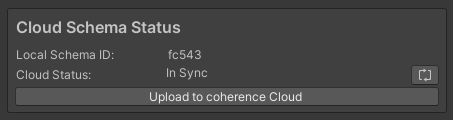
Check that all your Clients are using the same Schema ID.
Schema ID in coherence Hub (Baking section)
### **Prefab Variants use excessive memory**
When working with Prefab Variants, Unity leaks managed references (fields marked with `[SerializeReference]`). This can make your Prefab grow big and use more memory than necessary. Until Unity fixes this issue, we provide you with the ability to **prune** **the leaked references**. You can prune within the *Configure* window.
### Binding is interpolated into correct position after instantiating
If you are instantiating a Prefab from a **coherence** event (such as a [Command](/1.2/coherence-sdk-for-unity/networking-state-changes/commands.md), [OnValueSynced](/1.2/coherence-sdk-for-unity/networking-state-changes/value-sync-callbacks.md), [OnStateAuthority](/1.2/coherence-sdk-for-unity/authority-overview/authority-transfer.md), [OnLiveQuerySynced](/1.2/coherence-sdk-for-unity/components/coherencebridge.md#onlivequerysynced)...) and then changing its bindings in the same frame, the remote Clients will not instantly get updated values. Instead, if the binding has interpolation enabled, the value of the binding will be interpolated from the original value (from the instantiation step) to the updated value (from the change later in the frame).
The current recommended workaround is to make sure that the Prefab has initial values set before instantiation. Or in the case of position and rotation, those could be directly supplied to `Instantiate()` instead of setting them later in the frame.
### Clicking on a Prefab instance logs "CoherenceSyncEditor: Upgraded legacy archetype name on the CoherenceSync Prefab instance"
If you see this message, the CoherenceSync Prefab instance has been modified to point to the correct archetype name. If that's the case, select every CoherenceSync Prefab instance on your scene(s) to make sure this fixup happens. Even if you don't see the message, you're good to go. Make sure you save your project (Ctrl+S) to apply the changes (if any) to disk.
### InvalidOperationException: Insecure connection not allowed
Make sure you allow HTTP connections in Editor to avoid `InvalidOperationException: Insecure connection not allowed` errors. Find out how to enable HTTP connections in Unity's [InsecureHttpOption](https://docs.unity3d.com/2022.1/Documentation/ScriptReference/InsecureHttpOption.html) article.