Simulation Frame

The simulation frame represents an internal clock that every Client syncs with a Replication Server. This clock runs at a 60Hz frequency which means that the resolution of a single simulation frame is ~16ms.

There are 3 different simulation frame types used within the coherence:

Simulation Frame

Accessible via CoherenceBridge.NetworkTimearrow-up-right.

void Start()
{
    if (!CoherenceBridgeStore.TryGetBridge(gameObject.scene, out var bridge))
    {
        Debug.LogWarning("Couldn't find CoherenceBridge in the scene.");
        return;
    }
    
    var networkTime = bridge.NetworkTime;

    var serverFrame = networkTime.ServerSimulationFrame.Frame;
    Debug.Log("Server Simulation Frame: " + serverFrame);
    
    var clientFrame = networkTime.ClientSimulationFrame.Frame;
    Debug.Log("Client Simulation Frame: " + clientFrame);
}
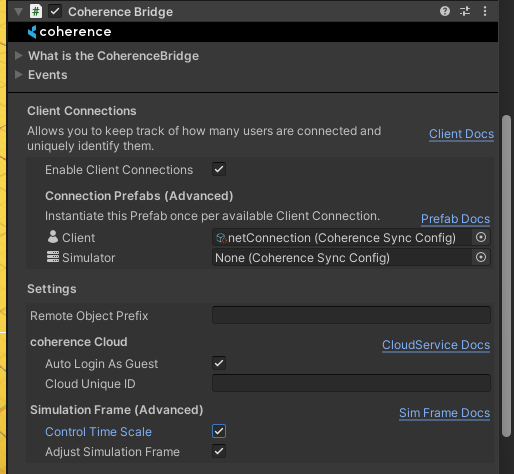
Every Client tries to match the Client simulation frame with the Server simulation frame by continuously monitoring the distance between the two and adjusting the NetworkTime.NetworkTimeScalearrow-up-right based on the distance, ping, delta time, and several other factors starting from the first simulation frame captured when the client first connects in NetworkTime.ConnectionSimulationFramearrow-up-right

circle-info

Unity's Time.timeScale is automatically set to the value of NetworkTime.NetworkTimeScale if the CoherenceBridge.controlTimeScale is set to true (default value).

In perfect conditions, all Clients connected to a single session should have exactly the same ClientSimulationFrame value at any point in the real-world time.

circle-exclamation

The Client simulation frame is used to timestamp any outgoing Entity changes to achieve a consistent view of the World for all players. The receiving side uses it for interpolation of the synced values.

Client fixed simulation frame

Local simulation frame that progresses in user-controlled fixed steps. Accessible via CoherenceBridge.ClientFixedSimulationFramearrow-up-right.

By default, the fixed step value is set to the Time.fixedDeltaTime.

Just like the basic Client simulation frame, it uses the NetworkTime.NetworkTimeScalearrow-up-right to correct the drift. The fixed simulation frame is used as a base for the fixed-step, network-driven simulation loop that is run via CoherenceBridge.OnFixedNetworkUpdatearrow-up-right. This loop is used internally to power the CoherenceInput and the GGPO code.

circle-info

Unlike ClientSimulationFrame, the CoherenceBridge.OnFixedNetworkUpdate loop never skips frames - it is guaranteed to run for every single frame increment.

Was this helpful?