> For the complete documentation index, see [llms.txt](https://docs.coherence.io/llms.txt). Markdown versions of documentation pages are available by appending `.md` to page URLs; this page is available as [Markdown](https://docs.coherence.io/1.6/manual/components/coherence-live-query.md).
# CoherenceLiveQuery
**CoherenceLiveQuery** is a component used to create an [area of interest](/1.6/manual/optimization/areas-of-interest.md), that is, an area of the world that the Client is interested in for the purpose of network traffic.
{% hint style="warning" %}
Having **at least one query** in the scene **is necessary** to receive any network update!
{% endhint %}
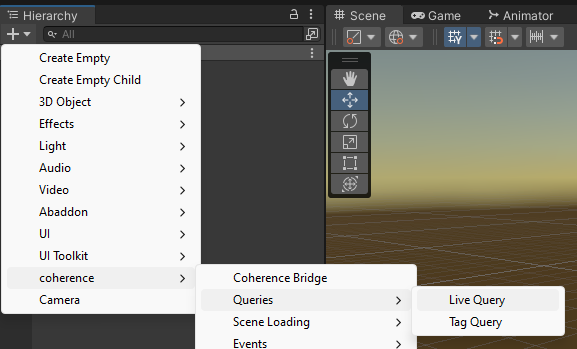
### Adding a LiveQuery to the scene
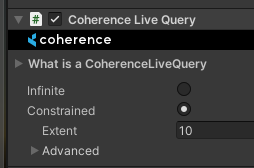
A LiveQuery defines the area of interest. It is defined by its Transform's position and its **extent** (half the side of the cube).
CoherenceLiveQuery component
There can be multiple LiveQueries in a single scene.
{% hint style="info" %}
Working with multiple LiveQueries is an **additive** operation and not a subtractive one.
{% endhint %}
### Moving a LiveQuery
A common approach is to place a CoherenceLiveQuery component on the camera and adjust the extent to reach as far as the far clipping plane or visibility distance.
Moving the GameObject containing the LiveQuery notifies the Replication Server that the query for that particular client has moved.
### Limits
The Replication Server imposes limits on number of queries a Client can create. Read more about it in the [Replication Server](/1.6/manual/replication-server.md#maximum-query-count-per-client) section.
{% hint style="success" %}
**Try it out yourself**
Go to our [First Steps](https://coherence.io/games/coherence/first-steps-tutorial) interactive demo and see it in action in scene 3 (Areas of Interest). There is also has an [accompanying explanation](/1.6/getting-started/samples-and-tutorials/first-steps-tutorial/3-spatial-partitioning.md) for the curious.
{% endhint %}