> For the complete documentation index, see [llms.txt](https://docs.coherence.io/llms.txt). Markdown versions of documentation pages are available by appending `.md` to page URLs; this page is available as [Markdown](https://docs.coherence.io/manual/replication-server/replication-server-api.md).
# Connecting to a replication server
This page illustrates a few API you can use to interact with the Replication Server.
## Connection to a Replication Server
When the Replication Server is running, you connect to it using the `Connect` method.
#### Connect to a local Replication Server
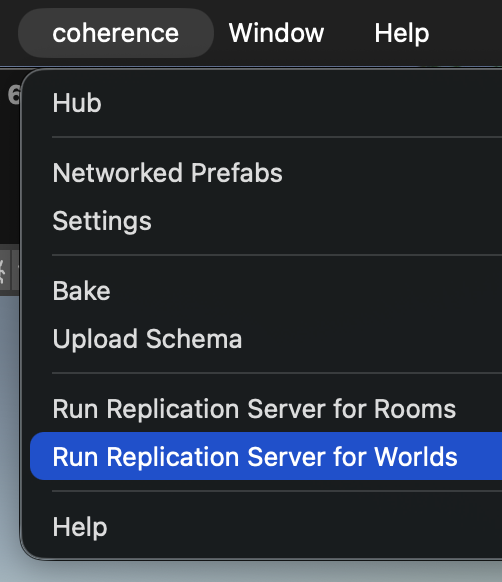
Before you connect, make sure you've [baked](/manual/baking-and-code-generation.md). Then, (re)start a Replication Server for Worlds or Rooms. In this example, we're going for Worlds.
```csharp
using Coherence.Toolkit;
using UnityEngine;
public class ConnectToLocal : MonoBehaviour
{
void Start()
{
CoherenceBridgeStore.TryGetBridge(this, out bridge);
var endpoint = new EndpointData
{
region = EndpointData.LocalRegion,
host = "127.0.0.1",
port = 32001,
schemaId = RuntimeSettings.Instance.SchemaID,
};
bridge.Connect(endpoint);
}
}
```
After trying to connect, you might be interested in knowing whether the connection succeeded. The Connect call will run asynchronously and take around 100 ms to finish, or longer if you connect to a remote Server.
#### Respond to connection events
```csharp
using Coherence.Connection;
using Coherence.Toolkit;
using UnityEngine;
public class ConnectToLocal : MonoBehaviour
{
private CoherenceBridge bridge;
void Start()
{
CoherenceBridgeStore.TryGetBridge(this, out bridge);
bridge.onConnected.AddListener(HandleConnected);
bridge.onDisconnected.AddListener(HandleDisconnected);
bridge.onLiveQuerySynced.AddListener(HandleLiveQuerySynced);
var endpoint = new EndpointData
{
region = EndpointData.LocalRegion,
host = "127.0.0.1",
port = 32001,
schemaId = RuntimeSettings.Instance.SchemaID,
};
bridge.Connect(endpoint);
}
private void HandleConnected(CoherenceBridge _) { /* ... */ }
private void HandleLiveQuerySynced(CoherenceBridge _) { /* ... */ }
private void HandleDisconnected(CoherenceBridge _, ConnectionCloseReason reason) { /* ... */ }
private void OnDestroy()
{
bridge.onConnected.RemoveListener(HandleConnected);
bridge.onDisconnected.RemoveListener(HandleDisconnected);
bridge.onLiveQuerySynced.RemoveListener(HandleLiveQuerySynced);
}
}
```
{% hint style="info" %}
The OnLiveQuerySynced event is triggered when the initial game state has been synced to the client. More specifically, it is fired when all entities found by the Client's first Live Query have finished replicating. This is the last step of the connection process and is usually a good place to start the game simulation.
{% endhint %}
{% hint style="info" %}
To connect to Cloud-hosted Servers, see [Rooms API](/hosting/coherence-cloud/coherence-cloud-apis/rooms.md) and [Worlds API](/hosting/coherence-cloud/coherence-cloud-apis/worlds.md) documentation.
{% endhint %}
{% hint style="info" %}
Check **Run in Background** in the *Unity settings* under *Project Settings > Player* so that the Clients continue to run even when they're not the active window.
{% endhint %}
To connect with multiple Clients locally, publish a build for your platform (*File > Build and Run*, details in [Unity docs](https://docs.unity3d.com/Manual/PublishingBuilds.html)). Run the Replication Server and launch the build any number of times. You can also enter Play Mode in the Unity Editor.
{% hint style="info" %}
For Mac Users: You can open new instances of an application from the Terminal:
```bash
open -n
```
{% endhint %}