> For the complete documentation index, see [llms.txt](https://docs.coherence.io/llms.txt). Markdown versions of documentation pages are available by appending `.md` to page URLs; this page is available as [Markdown](https://docs.coherence.io/getting-started/samples-and-tutorials/campfire-project/a-simple-text-chat.md).
# A simple text chat
#### **Topics covered**
Chat | [Lobbies](/hosting/coherence-cloud/game-services/lobbies.md)
Communication is an inherent part of online games and a chat, however simple, is a great way to enhance the range of expression for the players.
## Our use case
The chat composer
A chat balloon
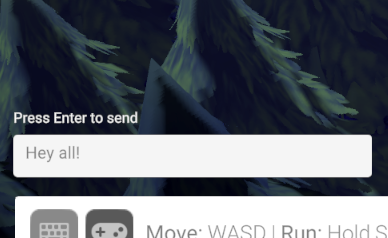
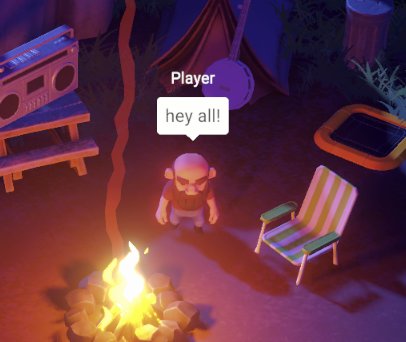
We wanted to implement a very simple chat system. By pressing Enter, a small screen-space UI opens up and allows the player to compose a message. When they press Enter again, a balloon on top of their character displays the message to them, and to all connected Clients.
This is done in three parts.
The `Chat` script on the player reads the input, requests `ChatComposerUI` to display the chat composer that is part of the screen-space scene UI.
When the player sends a chat message, `Chat` is informed by an event sent by `ChatComposerUI`, and sends a Network Command `SendChatMessage` to all other clients.
Finally, the received message is displayed in world-space over the player's head the script `ChatVisualiserUI` present in the **Player** Prefab.
### Getting extra mileage with byte\[]
By default, **coherence**'s Network Commands have a limit in the length that can be sent in one command. This is limited by the length of a UDP packet. While this limitation might be removed in the future, for now it means that chat messages can't be longer than a certain amount.
This amount, however, is quite different depending if you use a parameter of type `string` or of type `byte[]` (byte array). If you send a `string`, you will be able to pass on around 50 characters. This is really not much for a chat system.
If you use `byte[]` though, the number of characters goes up to (around) 500. Now we're talking!
So what we do in this demo is that first we convert the `string` that the player has typed in the UI into a byte array, and we send that via Network Command:
```csharp
private void SendText(InputAction.CallbackContext _)
{
string message = _chatComposer.GetText();
if (message != string.Empty)
{
byte[] encodedMessage = Encoding.UTF8.GetBytes(message);
sync.SendCommand(nameof(SendChatMessage), MessageTarget.Other, encodedMessage);
}
// ...
}
```
Then, on the receiving side, we reconvert it back into a `string`:
```csharp
[Command(defaultRouting = MessageTarget.Other)]
public void SendChatMessage(byte[] encodedMessage)
{
string decodedMessage = Encoding.UTF8.GetString(encodedMessage);
chatVisualiser.ShowText(decodedMessage);
// ...
}
```
This simple trick allows us to send longer messages, or to send the same message generating less traffic.
### Never miss a chat message
Because we are sending the chat messages on the `CoherenceSync` that is on the Player Prefab, it means that if that particular player instance is not visible to a Client because it's outside of their LiveQuery, they won't receive the Network Command and thus the chat message. This is maybe desirable in this demo, where the chat is visualised on top of the player.
But if chat messages are shown in a UI panel and players should receive them all regardless, then it might make more sense to rely on a special type of `CoherenceSync`: [Client Connections](/manual/client-connections.md). By sending the Network Command on that, it would ensure that the Command is sent and received regardless of LiveQuery ranges.
{% hint style="info" %}
Read the [Client Connections page](/manual/client-connections.md) for more info.
{% endhint %}
### Long-form chats
{% hint style="info" %}
This page talked about a simple chat system to use during gameplay, but keep in mind that **coherence** also has a solution for long-form chats as part of Lobby rooms. Players can be in a lobby before but also during gameplay.
For more information about Lobbies, read [the specific page](/hosting/coherence-cloud/game-services/lobbies.md).
{% endhint %}