> For the complete documentation index, see [llms.txt](https://docs.coherence.io/llms.txt). Markdown versions of documentation pages are available by appending `.md` to page URLs; this page is available as [Markdown](https://docs.coherence.io/manual/networking-state-changes/syncing-big-data.md).
# Big Data
Using fragmented channels to synchronize data that wouldn't usually fit in a packet.
Synchronizing entities with `byte[]` or `string` bindings, or sending commands with `byte[]` or `string` arguments allows you to sync large amounts of custom data. This data still has to fit into packets, and the default MTU is 1280 bytes.
The MTU limit applies to each packet, not to the total amount of pending changes. If several entity updates are waiting to be sent and they cannot all fit into one packet, coherence sends the highest-priority updates that fit and keeps the rest pending for a later send. Pending entity updates that were not sent because the packet was full have their priority increased, which prevents them from being starved forever.
For example, if all entities together produce about twice as much update data as fits in one packet every send cycle, coherence will spread those updates across packets over time. The effective result is a lower sampling rate for those entities rather than one group never being sent. Only the latest pending value for a binding is relevant when it is finally sent. If a value changes again before its pending update fits into a packet, the newer value replaces the older pending value.
The case that requires **fragmented channels** is when one serialized unit is too large to fit into a packet by itself. If a single entity update, component, string, byte array, or command is larger than the packet budget, it will not be synchronized on a non-fragmented channel while it remains that large. The SDK logs a warning in this case. To sync data of practically any size, use **fragmented channels** for synchronization of entities or commands.
{% hint style="warning" %}
Because of the implementation nature of **fragmented channels**, sending large units of data over a **fragmented channel** will delay subsequent updates and commands (even of different entities) sent over the same **fragmented channel** until the original data is fully transferred.
For this reason, it is recommended to **separate latency-sensitive bindings** (such as player position) and big-data bindings by dividing them into different **CoherenceSyncs**.
{% endhint %}
Data synchronized over the **fragmented channels** shares the bandwidth with other data synchronized over other channels, but data sent over the **non-fragmented channels** has priority over fragmented data. Because the **bandwidth is** **shared** (not multiplied), very large data sent over a fragmented channel might be more delayed if you're already syncing a lot of data over other channels.
Watch out for the amount of data you're sending over the fragmented channel, since the default bandwidth is not very high. For example, at the default MTU of 1280 bytes and default send rate of 20Hz, the maximum data bandwidth is around 24KB/s (this is after taking part of the bandwidth for coherence headers). If no other data is sent over other channels, 100KB of data sent over a fragmented channel would take **over 4 seconds** to transfer to the Replication Server, and **4 more seconds** to transfer to other Clients, which brings the total latency to over 8 seconds for 100KB of data. But 5KB of data would be synced to other clients in under 500ms.
{% hint style="success" %}
The default MTU of 1280 bytes and send rate of 20Hz are used because they will work on most internet connections and are thus optimal for most games.
{% endhint %}
{% hint style="info" %}
Note that there is currently no reporting of transfer progress in the SDK. Because of that, when sending considerable amounts of data, the synchronization might feel stuck, but it's probably just taking time to transfer the data to the replication server and then to other clients.
{% endhint %}
In case you want to synchronize a considerable amount of data, which would be too slow using the default bandwidth, we recommend exploring other options such as [Cloud Storage](/hosting/coherence-cloud/game-services/cloud-storage.md), rather than increasing the MTU or send rate.
### Syncing big data over entity bindings
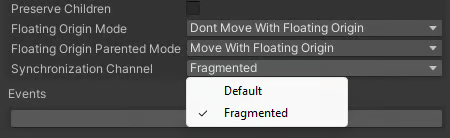
In the *Advanced Settings* of the **CoherenceSync,** you can change the **Synchronization Channel** of an entity. Choosing the **Fragmented** channel will synchronize creation, deletion, and all binding updates of the entity over the **Fragmented** channel, allowing you to sync data of any size.
{% hint style="info" %}
Note that the commands targeting that entity will still be sent over any channel. See the [commands section](#syncing-big-data-over-commands) for more details.
{% endhint %}
{% hint style="warning" %}
Use **Fragmented** channels only for entities that you are sure will have large data to synchronize, because, as noted before, those entities could potentially experience increased latency.
{% endhint %}
Since you don't want to send most bindings over the **fragmented channel**, the recommended way is to move bindings that contain big data to a separate **CoherenceSync,** and set only the new **CoherenceSync's Synchronization Channel** to **Fragmented**. One way of grouping those two entities together is by making the big data Prefab a child of the original Prefab using the [**PrefabSyncGroup**](/manual/networking-state-changes/parenting/nesting-prefabs-at-edit-time.md).
Note that the big data child object might not be replicated to the remote Clients at the same time as the parent object, so you need to be sure your game logic can handle a scenario where the big data child object is delayed.
### Syncing big data over commands
You can send commands over the **fragmented channel** to any entity, no matter if the entity is synchronized over the **Fragmented** or **Default** channel. To send a command over the **fragmented channel,** use the `SendCommandOverChannel(...)` and `SendCommandToChildrenOverChannel(...)` overloads, passing either **Fragmented** or **FragmentedOrdered** channel (for [ordered](/manual/networking-state-changes/commands.md#ordering-of-commands) commands) as an argument.
{% hint style="warning" %}
Use **Fragmented** channels only for commands that you are sure will have large data to send, because, as noted before, those commands could potentially experience increased latency.
{% endhint %}
```csharp
var data = new byte[5 * 1024]; // 5KB of data
sync.SendCommandOverChannel(
nameof(Player.SendData),
MessageTarget.AuthorityOnly,
Channel.Fragmented,
data);
```