> For the complete documentation index, see [llms.txt](https://docs.coherence.io/llms.txt). Markdown versions of documentation pages are available by appending `.md` to page URLs; this page is available as [Markdown](https://docs.coherence.io/manual/networking-state-changes/custom-bindings.md).
# Custom bindings
Extending what can be networked from a Component
{% hint style="info" %}
This is an **advanced** topic that aims to bring access to **coherence**'s internals to the end user.
{% endhint %}
The *Configure* window lists all variables and methods that can be synced for the selected Prefab. Each selected element in the list is stored in the Prefab as a `Binding` with an associated `Descriptor`, which holds information about how to access that data.
By default, **coherence** uses reflection to gather public fields, properties and methods from each of the Prefab's components. You can specify exactly what to list in the *Configure* window for a given component by implementing a custom `DescriptorProvider`. This allows you to sync custom component data over the network.
Take this player inventory for example:
```csharp
using UnityEngine;
public class Inventory : MonoBehaviour
{
[System.Serializable]
public class Item
{
public int id;
public string name;
public int durability;
}
public Item[] items = new Item[]
{
new Item {id = 0, name = "Shield", durability = 80},
new Item {id = 1, name = "Stick", durability = 50},
new Item {id = 2, name = "Stone", durability = 100},
};
public Item GetItem(int id)
{
foreach (var item in items)
{
if (item.id == id)
{
return item;
}
}
return default;
}
}
```
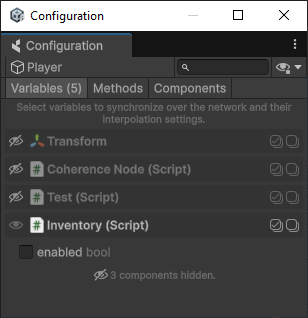
Since the inventory items are not immediately accessible as fields or properties, they are not listed in the *Configure* window. In order to expose the inventory items so they can be synced across the network, we need to implement a custom `DescriptorProvider`.
The Inventory component does not expose the inventory items by default.
### Creating a custom `DescriptorProvider`
The main job of the `DescriptorProvider` is to provide the list of `Descriptors` that you want to show up in the *Configure* window. You can instantiate new `Descriptors` using this constructor:
```csharp
public Descriptor(string name, Type ownerType, Type bindingType, bool required=false)
```
* *name*: identifying name for this `Descriptor`.
* *ownerType:* type of the MonoBehaviour that this `Descriptor` is for.
* *bindingType*: type of the ValueBinding class that will be instantiated and serialized in CoherenceSync, when selecting this `Descriptor` in the *Configure* window.
* *required*: if true, every network Prefab that uses a MonoBehaviour of *ownerType* will always have this Binding active.
{% hint style="info" %}
If you need to serialize additional data with your `Descriptor`, you can inherit from the `Descriptor` class or assign a `Serializable` object to `Descriptor.CustomData`.
{% endhint %}
Here is an example `InventoryDescriptorProvider` that returns a Descriptor for each of the inventory items:
```csharp
using System.Collections.Generic;
using Coherence.Editor;
using Coherence.Toolkit;
using Coherence.Toolkit.Bindings;
[DescriptorProvider(typeof(Inventory))]
public class InventoryDescriptorProvider : DescriptorProvider
{
public override List Fetch()
{
// Call base.Fetch to include public fields, properties and methods
var descriptors = base.Fetch();
var inventory = Component as Inventory;
foreach (var item in inventory.items)
{
var inventoryDescriptor = new Descriptor(name: item.name, ownerType: typeof(Inventory), bindingType: typeof(InventoryBinding));
inventoryDescriptor.CustomData = item.id;
descriptors.Add(inventoryDescriptor);
}
return descriptors;
}
}
```
To specify how to read and write data to the Inventory component, we also need a custom binding implementation.
### Creating a custom `Binding`
A `Descriptor` must specify through the *bindingType* which type of `ValueBinding` it is going to instantiate when synced in a `CoherenceSync`. In our example, we need an `InventoryBinding` to specify how to set and get the values from the `Inventory`. To sync the durability property of the inventory item, we should extend the `IntBinding` class which provides functionality for syncing int values.
```csharp
using Coherence.Toolkit.Bindings;
using Coherence.Toolkit.Bindings.ValueBindings;
using UnityEngine;
public class InventoryBinding : IntBinding
{
public override string BakedSyncScriptGetter => "GetItem(ItemId).durability";
public override string BakedSyncScriptSetter => "GetItem(ItemId).durability = @";
// Required constructor signatures
public InventoryBinding(Descriptor descriptor, Component unityComponent) : base(descriptor, unityComponent) { }
public InventoryBinding() { }
public int ItemId => (int)descriptor.CustomData;
public override int Value
{
get => ((Inventory) unityComponent).GetItem(ItemId).durability;
set => ((Inventory) unityComponent).GetItem(ItemId).durability = value;
}
}
```
{% hint style="info" %}
For the full list of supported binding types, see [Supported types in Commands and Bindings](/manual/networking-state-changes/supported-types.md).
{% endhint %}
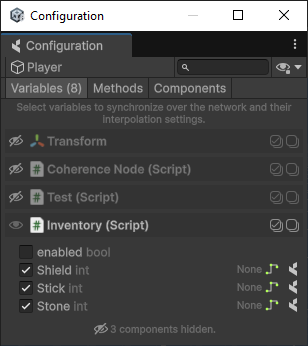
We are now ready to sync the inventory items on the Prefabs.
The Inventory items can now be synced across the network.