> For the complete documentation index, see [llms.txt](https://docs.coherence.io/llms.txt). Markdown versions of documentation pages are available by appending `.md` to page URLs; this page is available as [Markdown](https://docs.coherence.io/manual/networking-state-changes/rigid-bodies.md).
# Rigidbodies
### Overview
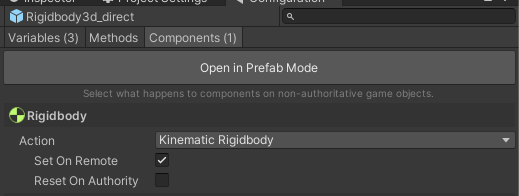
Supporting Unity physics in a network environment requires managing the state of rigid bodies on replicated Prefabs. Generally, if a Prefab using CoherenceSync has a *Rigidbody* or *Rigidbody2D* component, the replicated instances of the Prefab should have the body set to kinematic so that they do not simulate in the physics step on non-authoritative clients. There is a convenient configuration for this in the CoherenceSync configuration components tab.
Set the state of replicated Rigidbody components to kinematic
For most purposes, this is all that is required to have physically simulated entities correctly replicated on Clients. However, only the transform of the rigid body is actually replicated. For additional physical state replication a more advanced setup is required.
### Advanced Rigid Body support
The CoherenceSync component supports three modes for replication of Unity rigid bodies:
* **Direct** - the default mode used for basic replication of the transform of the Unity GameObject with a rigid body component. When a rigid body is detected, the position and rotation of the GameObject are provided by and assigned to the rigid body's position and rotation directly and Unity updates the GameObject transform after the physics step.
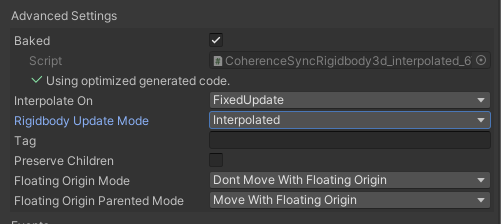
* **Interpolated** - similar to Direct mode, except the update to the rigid body position and rotation are applied using [MovePosition](https://docs.unity3d.com/ScriptReference/Rigidbody.MovePosition.html) and [MoveRotation](https://docs.unity3d.com/ScriptReference/Rigidbody.MoveRotation.html) which allows the Unity physics system to calculate rigid body state such as linear and angular velocity on Clients with replicated Entities.
{% hint style="info" %}
For best behavior, it is recommended that the interpolation timing use only **FixedUpdate**.\
See the article on [Interpolation](/manual/networking-state-changes/interpolation.md).
{% endhint %}
* **Manual** - disables automatic update of position and rotation of CoherenceSync Prefabs with rigid bodies and enables the use of callbacks, allowing custom implementation of how position and rotation updates are applied. The callbacks are *OnRigidbody2DPositionUpdate*, *OnRigidbody3DPositionUpdate*, *OnRigidbody2DRotationUpdate*, and *OnRigidbody3DRotationUpdate*.
Setting Rigidbody Update Mode to Interpolated for advanced physics setup.