> For the complete documentation index, see [llms.txt](https://docs.coherence.io/llms.txt). Markdown versions of documentation pages are available by appending `.md` to page URLs; this page is available as [Markdown](https://docs.coherence.io/manual/components/coherence-live-query.md).
# CoherenceLiveQuery
{% hint style="info" %}
See also [**Queries**](/manual/optimization/areas-of-interest.md)**.**
{% endhint %}
**CoherenceLiveQuery** is a component used to filter networked entities within an area of the world that the Client is interested in.
{% hint style="success" %}
You **must** have at least one Live Query running for replication to work.
{% endhint %}
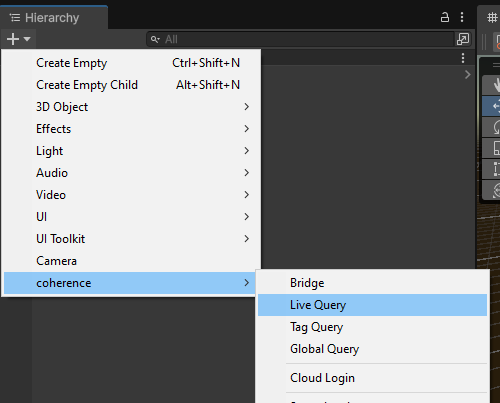
### Adding a Live Query to the scene
A Live Query defines a volume to network.
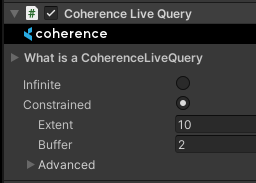
This volume is defined by the Transform's position, its **extent** (half the side of the cube) and also a buffer to the extent (see [Hysteresis](#hysteresis)).
CoherenceLiveQuery component
There can be multiple Live Queries in a single scene.
{% hint style="info" %}
Working with multiple Live Queries is an **additive** operation and not a subtractive one.
{% endhint %}
### Moving a Live Query
A common approach is to place a CoherenceLiveQuery component on the camera and adjust the extent to reach as far as the far clipping plane or visibility distance.
Moving the GameObject containing the Live Query notifies the Replication Server that the query for that particular client has moved.
### Hysteresis
When an entity moves near the edge of a Live Query extent, it might rapidly enter and exit the query. This can cause frequent create and destroy events, which may lead to performance degradation.
To avoid this, you can increase the **buffer** field on the Live Query. An entity is only removed from the query after it moves outside the query's extent **plus the buffer**. But to be added to the Live Query, it must enter the query's extent without the buffer.
The buffer field can also be changed during the runtime, and the Replication Server will be notified of it changing.
### Limits
The Replication Server imposes limits on number of queries a Client can create. Read more about it in the [Replication Server](/manual/replication-server.md#maximum-query-count-per-client) section.
{% hint style="success" %}
**Try it out yourself**
Go to our [First Steps](https://coherence.io/games/coherence/first-steps-tutorial) interactive demo and see it in action in scene 3. There is also has an [accompanying explanation](/getting-started/samples-and-tutorials/first-steps-tutorial/3-spatial-partitioning.md) for the curious.
{% endhint %}